Ordering 2.0 Now Supported in CC Home Screen Preview
Overview
This change is only seen for brands on Menu V2.
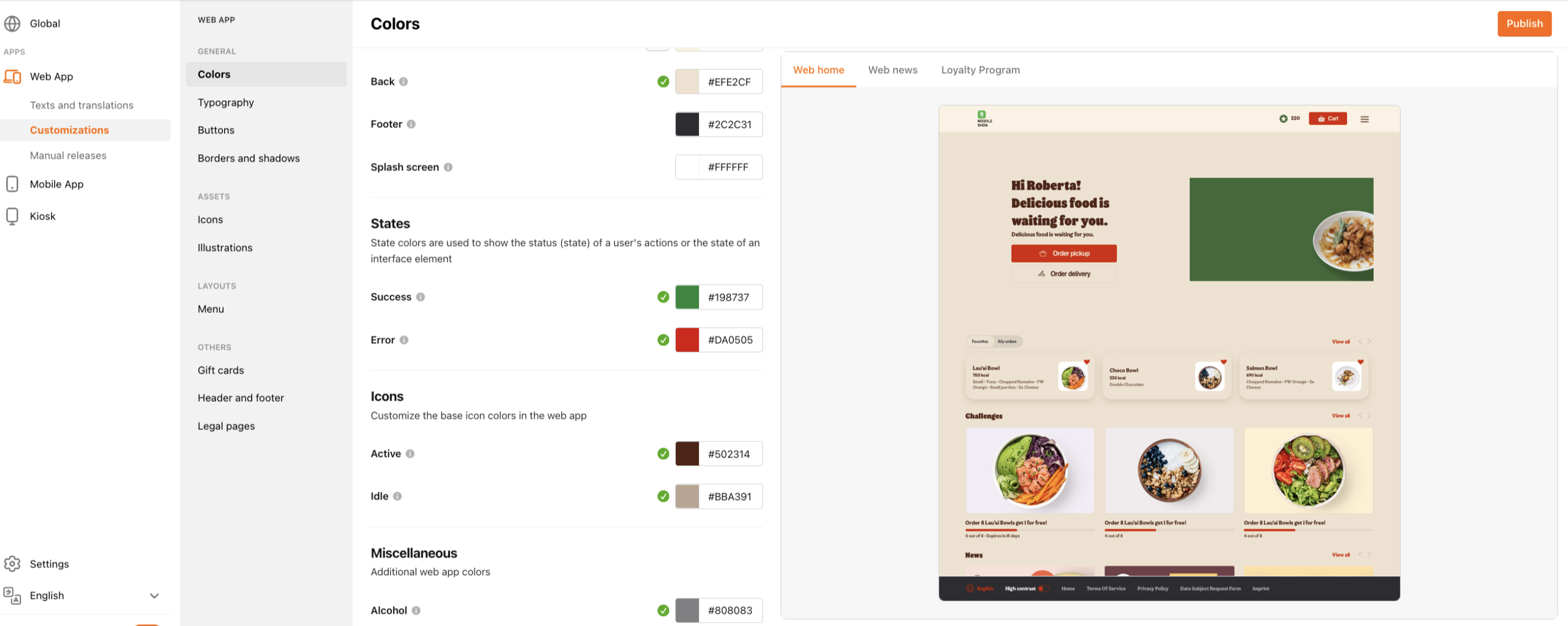
We’ve updated the Home Screen Preview in Customization Center (CC) to support Ordering 2.0. This means that when you make visual updates in CC, you’ll now see an accurate preview that reflects your Ordering 2.0 configuration.
What’s New
- Visual Updates: Any changes made to your brand’s home screen in CC, such as images, banners, or layout adjustments, will now instantly display in the preview panel.
- Ordering 2.0 Compatibility: The preview fully supports the latest Ordering 2.0 design and functionality, giving you a true representation of how your experience appears to guests.
Why This Matters
This enhancement allows your team to:
- Save time when making design or content updates
- Reduce guesswork by previewing updates instantly
- Ensure brand visuals remain consistent and accurate across Ordering 2.0 experiences
How It Works
- Open the Home Screen section in CC.
- Click on "Web App"
- Make your desired updates (e.g., image, color, layout, or content changes).
- The preview panel on the right will automatically refresh to reflect your changes.
- Select "Publish" in the righthand corner to save your changes.