Deliveries: Overview
The Deliveries view in the Management Center lists all Dispatch deliveries for your brand. From here, you can see delivery status, DSP delivery IDs, estimated and actual pickup and delivery times, and cancellation details. No database export needed.
Use the Deliveries view to:
- Track the status of active and completed Dispatch deliveries
- Identify deliveries that were canceled, rejected, or delayed
- Review all status changes for a specific order
- Find the information needed to file a dispute with your DSP
The Deliveries view is available to brands with Dispatch enabled. Data is scoped to your brand; you only see deliveries for your own locations.
In the Management Center, go to Orders > Deliveries.
Deliveries List Page
The Deliveries list shows all Dispatch deliveries for your brand. By default, deliveries are sorted with the most recent first.
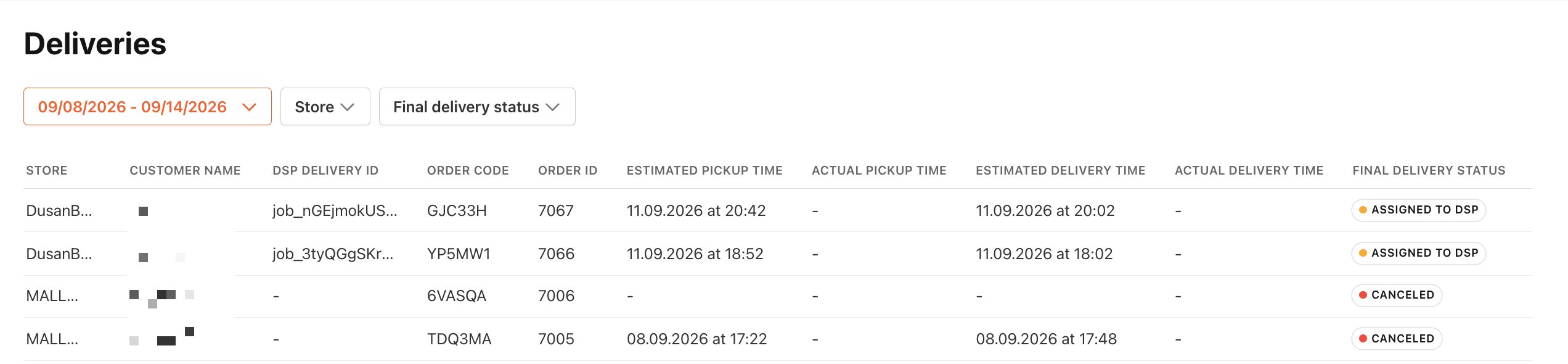
Use the filters at the top of the list to narrow your results:
- Date range: Filter by order creation date.
- Store: Filter by one or more locations (multi-select, searchable).
- Final delivery status: Filter by one or more delivery statuses (multi-select).
| Column | Description |
|---|---|
| Store | The store the order was placed at. |
| Customer Name | The name of the customer who placed the order. |
| DSP Delivery ID | The unique delivery ID assigned by the delivery service provider (DSP). |
| Order Code | The order code for the delivery. |
| Order ID | The internal PAR Ordering order ID. |
| Est. Pickup Time | The estimated time the driver was expected to pick up the order. |
| Actual Pickup Time | The time the order was actually picked up. Displays — if the order has not been picked up. |
| Est. Delivery Time | The estimated time the order was expected to be delivered to the customer. |
| Actual Delivery Time | The time the order was actually delivered. Displays — if the order has not been delivered. |
| Final Delivery Status | The current or final status of the delivery, shown as a color-coded badge. |
Delivery Statuses
Delivery statuses appear as color-coded badges in the Final Delivery Status column.
| Status | Description |
|---|---|
| Unassigned | No driver or DSP has been assigned to the delivery yet. |
| Assignment Failed | The system was unable to assign a driver or DSP to the delivery. |
| Assigned to Driver | A driver has been assigned to the delivery. |
| Assigned to DSP | The delivery has been assigned to a delivery service provider. |
| Driver in Store | The assigned driver has arrived at the store to pick up the order. |
| Delivery in Progress | The order has been picked up and is on its way to the customer. |
| Order Delivered | The order was delivered to the customer. |
| Rejected by Driver | The assigned driver rejected the delivery. |
| Rejected by DSP | The delivery service provider rejected the delivery. |
| Canceled | The delivery was canceled. The Delivery history panel shows who canceled it. See Cancellation origin below. |
Delivery History
To see all status changes for a delivery, select that row in the list. The Delivery history side panel opens and shows two sections:
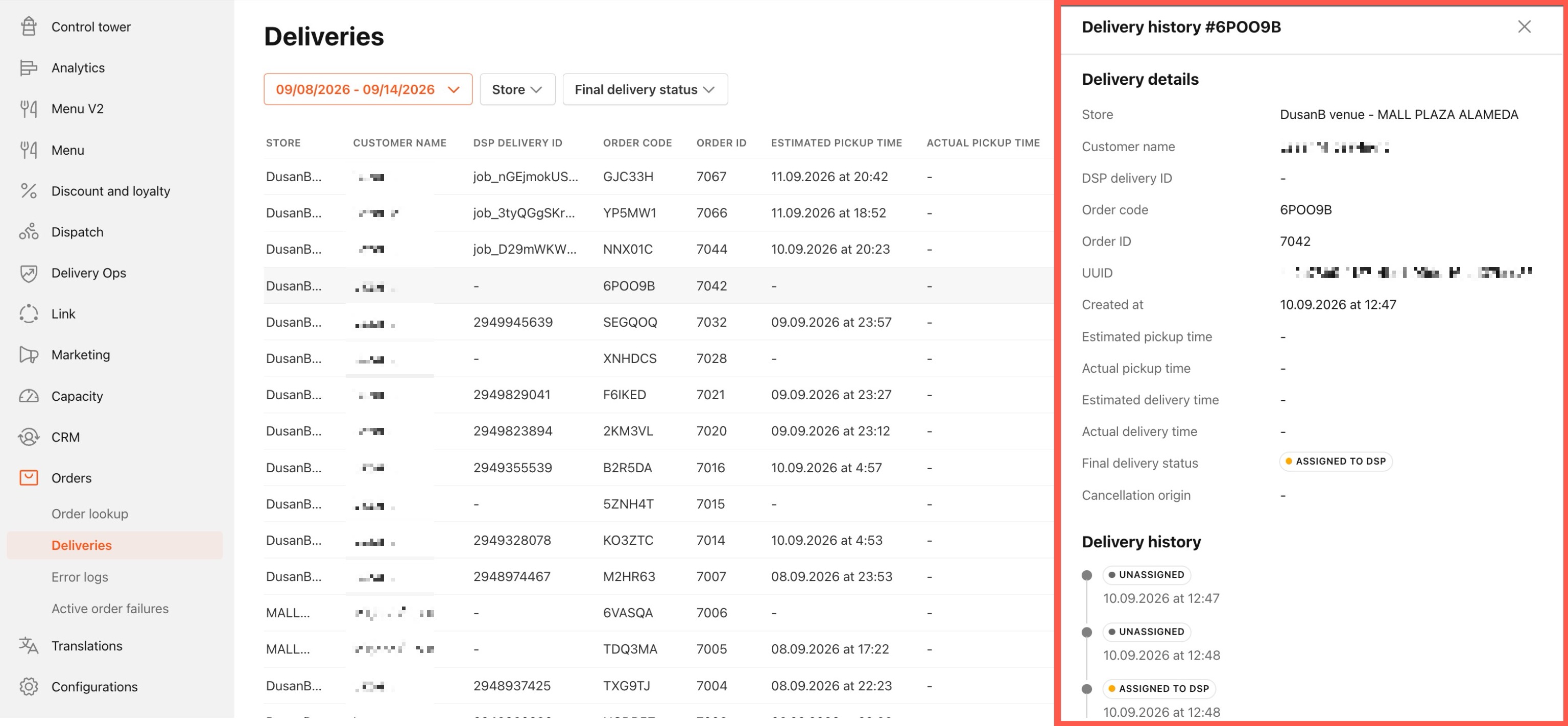
- Delivery details: A summary of the delivery including store, customer name, DSP delivery ID, order code, order ID, estimated and actual times, final delivery status, cancellation origin, order UUID, and creation date.
- Delivery history: Each status transition the delivery went through, listed in chronological order with a timestamp per stage.
History Stages
| Stage | Description |
|---|---|
| Order Created | The delivery record was created in PAR Ordering. |
| Assigned to DSP | The delivery was assigned to a delivery service provider. |
| Driver Assigned | A driver was assigned to pick up the order. |
| Driver in Store | The driver arrived at the store. |
| Delivery in Progress | The driver picked up the order and is en route to the customer. |
| Order Delivered | The order was delivered to the customer. |
| Rejected by Driver | The assigned driver rejected the delivery. |
| Rejected by DSP | The delivery service provider rejected the delivery. |
| Canceled | The delivery was canceled. |
Cancellation Origin
When a delivery is canceled or rejected, the Cancellation Origin field in the Delivery details section of the side panel shows who canceled the delivery.
| Cancellation origin | Description |
|---|---|
| Driver | The assigned driver rejected or canceled the delivery. |
| DSP / partner | The delivery service provider rejected the delivery. |
| Store (Core) | The store or brand canceled the delivery through PAR Ordering. |
| DSP | The delivery service provider canceled an accepted delivery. |
| Auto-cancelled | The delivery was automatically canceled by the system. |
If a delivery was not canceled, the Cancellation Origin field is blank.
