Inventory Troubleshooting Report
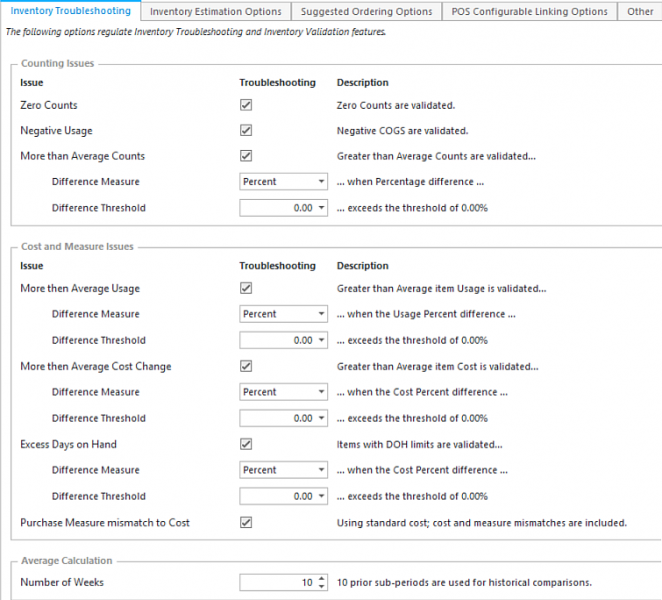
Use this report to view forgotten inventory counts, negative usage, conflicting cost change and excess ending from missing inventory data.
Parameters
- Unit Group: Select Unit Group to view.
- Unit: Select Unit to view.
- Calendar: Select Calendar.
- Inventory Period: Select the period you wish to view.
- Account Reporting Group: Select the group of accounts you wish to view.
- Account: Select the account you wish to view.
- Include Zero Inventory: Put a check to include inventory items with zero inventory values.
- Usage Change Type: Dollar or Percent.
- Usage Change Threshold: Default is $50. This is the cap at which items with average usage change are shown above and below.
- Average Weeks: Default is 5. This is how many weeks you wish to go back to calculate the other parameters thresholds.
- Price Change Type: Dollar or Percent.
- Price Change Threshold: Default is $10. This is the cap at which items with a change in cost are shown above and below since last period.
- Excess Inventory Threshold: Default is $50. This is the cap at which items with average excess inventory are shown above and below.
- Count More Average Type: Quantity or Percent.
- Count More Average Threshold: Default is 5. This is the cap at which items count shown are above and below since last period.
- Include No Ending Inventory: A check includes this value.
- Include Negative Usage: A check includes this value.
- Include Wrong Purchase Measure: A check includes this value.
Pieces of this report
No Ending Inventory
Negative Usage
Usage Change
Cost Change
Excess Ending
Wrong Purchase Measure
Count More Average
No Ending Inventory
Items that have purchases and/or beginning inventory counts but do not have ending inventory counts. Unless your Unit truly sold out of this item, it is likely this is an error.

Columns
- 'ITEM DESCRIPTION' column: Local Description for Unit level report; Master Description for MU and Admin reports.
- 'ACCOUNT DESCRIPTION' column: Account Description.
- 'REPORTING MEASURE' column: Reporting Measure.
- 'BEGINNING INVENTORY' column: for the Inventory period selected.
- 'PURCHASES' column: for the Inventory period selected.
- 'ENDING INVENTORY' column: for the Inventory period selected.
- 'AVE INVENTORY' column: Average inventory qty for the amount of weeks selected in parameters.
- 'ENDING COST' column: Cost for the inventory period selected using the selected costing method from the Item Master (FIFO, Last Cost, Weighted Average).
- 'IN TEMPLATE' column: Is this item included in the inventory count template (even if the template is hidden) for this unit.
- 'AVE INVENTORY $' column: = Ave Inventory x Ending Cost.
Negative Usage
Items whose Ending Counts are higher than the total of Beginning Inventory + Purchases +/- Unit Trades – Credit Memos. Unless your Unit received items from an AP Voucher, it is likely that this is an error.
Quick Note: The items are listed in order of the Item Usage $ column.

Columns
- 'ITEM DESCRIPTION' column: Local Description for Unit level report; Master Description for MU and Admin reports.
- 'ACCOUNT DESCRIPTION' column: Account Description.
- 'REPORTING MEASURE' column: Reporting Measure.
- 'BEGINNING INVENTORY' column: for the Inventory period selected.
- 'PURCHASES' column: for the Inventory period selected.
- 'ENDING INVENTORY' column: for the Inventory period selected.
- 'ITEM USAGE' column: = Beginning Inventory + Purchases – Ending Inventory.
- 'AVE INVENTORY' column: Average inventory qty for the amount of weeks selected in parameters.
- 'ENDING COST' column: Cost for the inventory period selected using the selected costing method from the Item Master (FIFO, Last Cost, Weighted Average).
- 'ITEM USAGE $' column: = Item Usage x Ending Cost.
- 'AVE INVENTORY $' column: Average inventory $ for the amount of weeks selected in parameters.
Usage Change
Items whose usage has changed according to the current usage vs. the average usage.
Quick Note: If you have zero ending inventory for items, it assumes that all the item was used, which may be driving high Current Usage values.

Columns
- 'ITEM DESCRIPTION' column: Local Description for Unit level report; Master Description for MU and Admin reports.
- 'ACCOUNT DESCRIPTION' column: Account Description.
- 'REPORTING MEASURE' column: Reporting Measure.
- 'CURRENT USAGE' column: for the Inventory period selected.
- 'AVE USAGE' column: for the amount of weeks selected in parameters.
- 'DIFFERENC E ' column: = Current Usage – Average Usage.
- 'ITEM COST' column: Cost for the inventory period selected using the selected costing method from the Item Master (FIFO, Last Cost, Weighted Average).
- 'DOLLAR IMPACT' column: = Difference x Item Cost.
Cost Change
Items whose cost has changed according to the parameter value entered vs. last period.

Columns
- 'ITEM DESCRIPTION' column: Local Description for Unit level report; Master Description for MU and Admin reports.
- 'ACCOUNT DESCRIPTION' column: Account Description.
- 'REPORTING MEASURE ' column: Reporting Measure.
- 'OLD COST' column: Cost for the Period prior to the inventory period selected using the selected costing method from the Item Master (FIFO, Last Cost, Weighted Average).
- 'NEW COST' column: Cost for the inventory period selected using the selected costing method from the Item Master (FIFO, Last Cost, Weighted Average).
- 'DIFFERENCE' column: = Old Cost – New Cost.
- 'ITEM USAGE' column: inventory qty for the Inventory period selected.
- 'DOLLAR IMPACT' column: = Difference x Usage.
Excess Ending
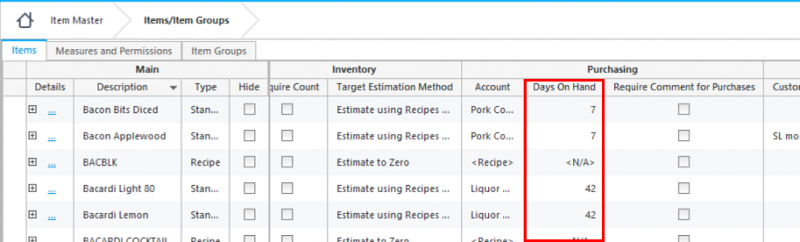
Items whose ending inventory value exceeds the average value according to the parameter value entered based on Days on Hand.

Columns
- 'ITEM DESCRIPTION' column: Local Description for Unit level report; Master Description for MU and Admin reports.
- 'ACCOUNT DESCRIPTION' column: Account Description.
- 'REPORTING MEASURE' column: Reporting Measure.
- 'ENDING UNITS' column: Qty for the inventory period selected.
- 'ENDING COST' column: Cost for the inventory period selected using the selected costing method from the Item Master (FIFO, Last Cost, Weighted Average).
- 'AVE UNITS' column: Qty for the for the amount of weeks selected in parameters.
- 'AVE DOLLARS ' column: Cost for the for the amount of weeks selected in parameters.
- 'DOH' column: how long this items has been in inventory.
- 'EXCESS UNITS' column: = Ave Units x (Actual DOH – Target DOH).
- 'EXCESS DOLLARS' column:= Excess Units x Ending Cost.
Quick Note: In order for this piece to work properly, DOH needs to be entered in the Item Master.
The Excess Quantity value is calculated as [ActualAvgQty] * ([ActualDaysOnHand] - [TargetDaysOnHand])
Count More Average
Items whose count differs from the average count.

Columns
- 'ITEM DESCRIPTION' column: Local Description for Unit level report; Master Description for MU and Admin reports.
- 'MINOR CATEGORY' column: Account Description.
- 'COUNT SIZE' column: Counting Measure.
- 'BEGINNING INVENTORY' column: for the Inventory period selected.
- ' PURCHASES' column: for the Inventory period selected.
- 'ENDING INVENTORY' column: for the Inventory period selected.
- 'ITEM USAGE' column: = Beginning Inventory + Purchases – Ending Inventory.
- 'AVE INVENTORY' column: Average inventory qty for the amount of weeks selected in parameters.
- 'ENDING COST' column: Cost for the inventory period selected using the selected costing method from the Item Master (FIFO, Last Cost, Weighted Average).
- 'ITEM USAGE $' column: = Item Usage x Ending Cost.
- 'AVE INVENTORY $' column: Average inventory $ for the amount of weeks selected in parameters.
Wrong Purchase Measure
Items whose purchase measures appear to be entered incorrectly in invoicing when compared to the Standard Pricing from the Item Master.

This will show you those items, to adjust these measures you can then run the Inventory Value Validation report (Inventory Value Validation_Report), Fix Cost and Measure Errors or Purchases to correct the invoice incorrect measure.
What Issues Display as a Warning?
The issues that display when you validate counts is determined by the Administrator in Application Settings.