Inventory Shift Comparison Report
Use this report to show usage and variances associated with daily shift counts. The items on this report are those that have a starting and/or ending inventory entered for the shifts chosen in the report parameters. This could be a helpful tool to see usage as well as to ensure inventory is not leaving the restaurant (for example, checking the prior end of day count with next morning counts).
Parameters
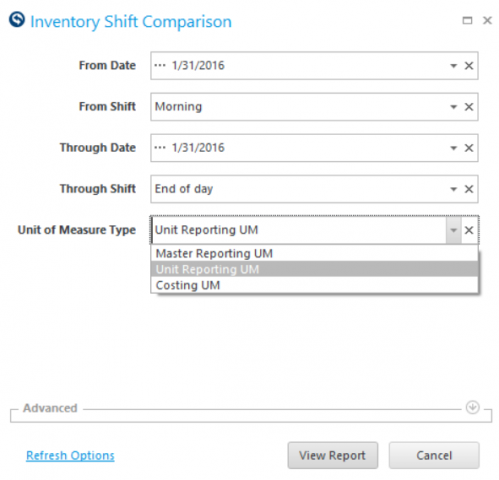
- From Date: Select Start Date to view from.
- From Shift: Select the State Shift to view from.
- Through Date: Select End Date to view thru.
- Through Shift: Select End Shift to view thru.
- Unit Of Measure Type: Select the Unit of Measure Type to use.
Columns
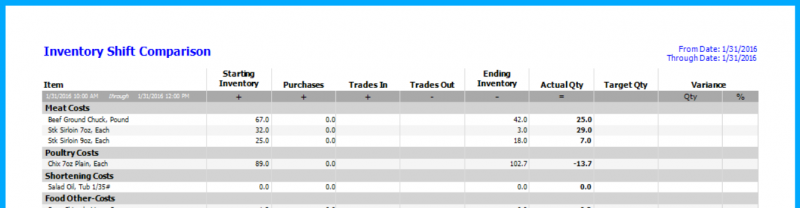
- 'STARTING INVENTORY' column: the count entered for the From Date / From Shift chosen.
- 'PURCHASES' column: the quantity of this item whose assigned purchases are the From Date / From Shift, the Through Date / Through Shift or any Date / Shift that occurred between the From and Through. Purchases are associated with shifts using Assign Shift Counts to Purchases.
- 'TRADE IN' column: the quantity of this item whose assigned incoming trades are the From Date / From Shift, the Through Date / Through Shift or any Date / Shift that occurred between the From and Through.
- 'TRADES OUT' column: the quantity of this item whose assigned outgoing trades are the From Date / From Shift, the Through Date / Through Shift or any Date / Shift that occurred between the From and Through.
- 'ENDING INVENTORY' column: the count entered for the Through Date / From Shift chosen.
- 'ACTUAL QTY' column: the actual usage of this item (Starting Inventory + Purchases + Trades In – Trades Out – Ending Inventory = Actual Qty).
- 'TARGET QTY' column: the actual usage of this item from recipes between the From Date / Shift and Through Date / Shift.
- 'VARIANCE QTY' column: the difference between the Actual Qty and the Target Qty.
- 'VARIANCE %' column: the percentage of Variance Qty against the Target Qty.
Error Messages Running the Inventory Shift Comparison
- Ending Shift should be greater than Beginning Shift: the time recorded for the ending shift is ¬before the time recorded for the beginning shift. To fix the shift times, go to How is a Shift Count Time Changed?
- Beginning Count does not exist: There is not a daily count recorded for the Date / Shift chosen for the From options. To fix, enter a count for the shift or chosen or choose a different shift in the report parameters.
- Ending Count does not exist: There is not a daily count recorded for the Date / Shift chosen for the Through options. To fix, enter a count for the shift or chosen or choose a different shift in the report parameters.