Inventory Comparison Report
Use this report to view the item count, cost and inventory values for multiple inventory periods. This report may help to give you an idea if your values are higher this period. If your cost is higher, check that your invoices have been entered correctly. If your inventory is high, check that your counts have been entered correctly.
The can be helpful when investigating issues with Target Item Use vs Actual Use or COGS.
Parameters
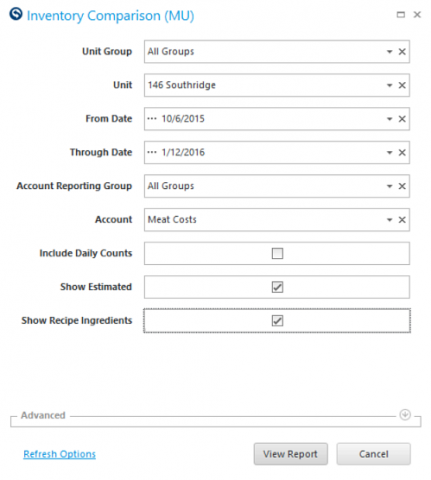
- Unit Group: Select the Unit Group to view.
- Unit: Select the specific Unit to view.
- From Date: Select Start Date to view from.
- Through Date: Select End Date to view thru.
- Account Reporting Group: Select the account group you wish to view.
- Account: Select the account you wish to view.
- Include Daily Counts: If inventory is counted daily, a check in this box will populate daily counts if they exist for the dates chosen.
- Show Estimated: If counts are estimated, a check in this box will populate estimated counts if they exist for the dates chosen.
- Show Recipe Ingredients: A check in this box will populate recipe ingredients if they exist.
Report
By ordering the dates and counts in order, you can quickly identify trends with your inventory counts.
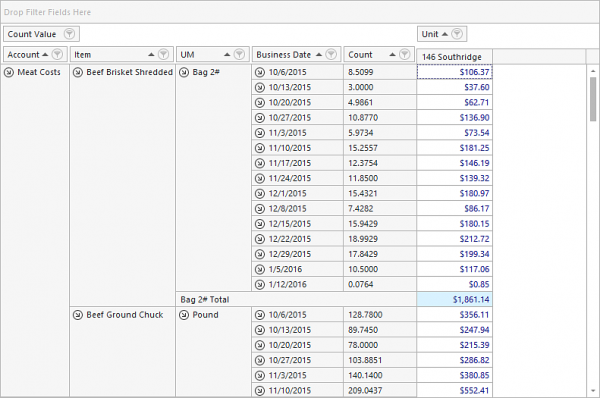
Quick Note: The Count Value applies the item's cost (according the costing method in the Item Master) to the count.