Olo: Prevent Double Earning Solution for Online Orders
Overview
Many Punchh-powered brands use Olo as their primary online ordering provider. In some cases, when a customer places an order on Olo as a guest (without logging in), Punchh doesn’t receive the transaction details. Additionally, since barcodes aren’t printed on these guest checks (due to potential issues with duplicate earnings), there’s no way for users to manually claim loyalty points. To improve this experience, we’ve introduced a new approach using Olo webhooks. This allows Punchh to capture guest order data and help users earn loyalty rewards, even when ordering as a guest.
With this process, you will be able to:
- Enable guests to earn loyalty points on the guest's Online orders (checkout as a guest without authentication).
- Improve the guest adoption rate by opening the way to earn even from online guest orders.
- Stop double-earning for authenticated transactions.
Milestones
- Extend the usage of the OLO Order closed webhook. We have utilized the same webhook before for Transaction to profile matching. We are targeting only guest orders and associating them with Punchh users.
- Alter the transaction number of the checkin in the Punchh database with what we got in the OLO webhook as the POS transaction number. This will then be used to match and see if the earning is already been awarded to the guest who is trying to scan the barcode printed on the check.
Technical Overview
Prerequisites
- Send Olo the Webhook Base URL. Review Olo Webhooks Implementation for details.
- Inform Olo to enable order-closed webhooks.
- Olo then needs to configure these details on their dashboard and provide you with the Olo webhook secret.
Dashboard Configuration
Work with your Punchh Representative to enable the following flags for your business:
- Enable Olo Webhooks
- Enable Olo order-closed webhooks (you will need the Olo webhook secret obtained in the steps above)
- Enable the Stop Double Earning flag
- Configure the Login Providers field
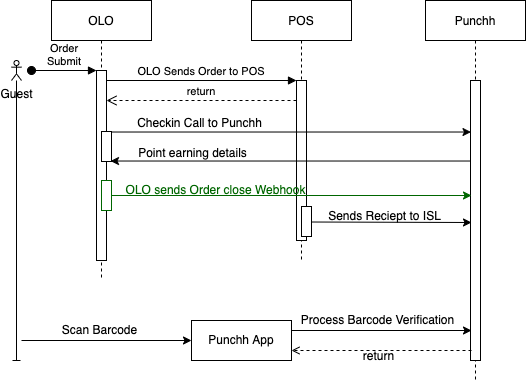
Once enabled, whenever an order is placed online, Olo then sends the order to the POS and receives a POS transaction number in return. This transaction number will then be availed to the Punchh system through the Order Close webhook. Punchh will utilize this information to check if the scanned barcode is for a transaction that already exists in a checkin (Online Ordering Checkin). If so, we will prompt the user with an error.
Testing
Once all the prerequisites and dashboard configurations are complete, use the steps below to test if the solution is working properly:
- Place an order online as a logged-in user. (After a certain time delay [order fulfillment, etc], Olo sends the checkin request to Punchh, and the user earns points for the order placed online.
- When this order gets to the POS, print the receipt of the order with the barcode.
- Scan the barcode printed on the receipt using the Punchh App.
- The above step should result in an error saying "Multiple Checkin is not possible for the same receipt".
If a guest scans their physical POS receipt before the Olo Order Close webhook is submitted, the double-earning prevention mechanism will not block the second earn. The feature is designed to check for an existing Olo record at the time of a barcode scan. When a scan arrives first, there is no mechanism in place to retroactively block the Olo webhook checkin that follows. This scenario may occur due to delays on the POS or Olo side and is not the expected order of events under normal operating conditions.
