NCR Silver (Essentials and PRO) Loyalty API flow
NCR Silver Product Offerings
NCR Silver offers an array of products. Not all online ordering features are available with all products.
Silver is generally a generic term used to refer to all of the NCR Silver products. Where needed, the following identifiers will be used to identify the feature or field available with each product:
SILV = NCR Silver
SPRE = NCR Silver Pro Restaurant
Supported barcodes : It supports 20 digit barcode which can be scanned using our mobile App.
Every request contains these headers:
- NCR Access token: Unique Authorization bearer key to authenticate the request
- Merchant Id: Identifier of the merchant account in Silver system
- NCR Store_id: Silver system generated store identifier
- Store-Number: Store number as configured in Silver.
- API-Store-ID: API store identifier as configured in Silver. This is optional field. It is not present in headers if not defined in Silver.
- POS-Station-ID: Identifier of the POS station from which the request originated.
These fields are also present in the POST request messages to make message queuing simple.
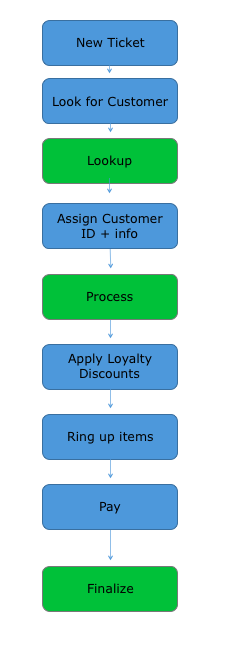
Typical flow of loyalty requests for SILV is shown below:
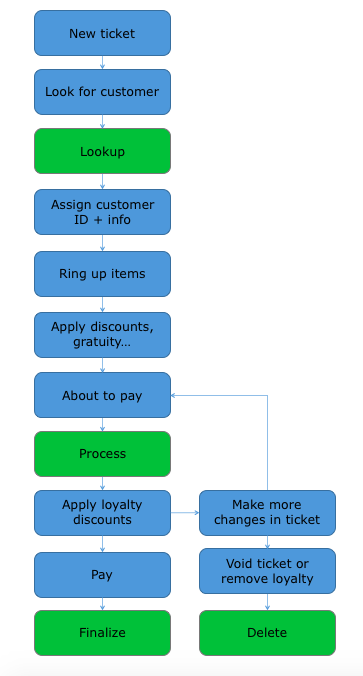
Typical flow of loyalty requests for SPRE is shown below:
Lookup (GET, REQUIRED)
The Lookup request is issued when the Loyalty Client needs to find loyalty member based on a member identifier. Loyalty Host will respond with the customers matching the identifier, or with an empty set.
The request URL may contain the following parameters:
| Field | SILV | SPRE | Comments |
|---|---|---|---|
| MemberPhone | REQ | OPT | Loyalty member's phone number to search by. |
| MemberNumberManual | Not supported | OPT | Manually entered member number (e.g. read from a card, not scanned or swiped). |
| MemberBarcodeData | Not supported | OPT | Barcode or QR code data scanned from member's card or smartphone to search by. |
| MemberTrackData | Not supported | OPT | Magnetic card track data scanned from member's card, to search by. |
At least one of the member fields must be filled in.
Request example:
GET http://www.server.com/pos/loyalty/lookup?MemberPhone=5553867080
Process (POST, OPTIONAL)
For SPRE:
The Process request is issued just before payment, when all items on the ticket are already known The request may actually be issued multiple times for the same ticket if user continues to make changes to the ticket.
The request is modeled as POST because it actually changes Loyalty Host's state. Loyalty Host should "lock" rewards on the account after it promises them via response to the Process request. This helps prevent fraud where the same reward might be claimed simultaneously in different stores. The lock can be removed when the transaction is finalized (Finalize request) or deleted (Delete request), or after certain time period (e.g. 8 hours).
The POS may issue multiple Process requests in sequence if the cashier continues to change order before closing it. Multiple Process requests for the same transaction and member should not decrease points balance multiple times, only keep lock on the same points, and truly decrement them only after the Finalize call.
Loyalty Host does not have to implement this method, but it will not be able to offer any rewards or send messages to be displayed on the screen or printed on the receipt, only accrue points. When the host does not support the method, it should return HTTP status 501 not implemented and error code "NOT_IMPLEMENTED".
For SILV:
The Process request is issued immediately after a customer is assigned to the ticket, prior to any items being added to the ticket. It is issued one time to obtain the loyalty rewards available to the customer.
The request contains the following fields:
| Field | SILV | SPRE | Comments |
|---|---|---|---|
| MerchantId | REQ | REQ | Merchant account number in the Silver system |
| StoreId | REQ | REQ | Store identifier |
| ApiStoreId | OPT | OPT | API store identifier (added in release 4.2) |
| StoreNumber | REQ | REQ | Store number as configured in the Silver system (added in release 3.5) |
| PosStationId | Not supported | REQ | Identifier of the POS station from which the request originated, e.g. "POS1" |
| Member/MemberId | REQ | REQ | ID of the customer that we are requesting the rewards for |
| Member/ExtensionData | Not supported | OPT | Extended information about the member if it was returned from the Lookup call (pass-through information). |
| BusinessDate | Not Supported in Process; REQ in Finalize | REQ | Business date of the ticket |
| TicketNumber | Not Supported in Process; REQ in Finalize | REQ | Number of the ticket |
| Ticket/EmployeeId | Not Supported in Process; REQ in Finalize | REQ | ID of the employee who assigned the customer to the ticket |
| Ticket/EmployeeName | Not Supported in Process; REQ in Finalize | REQ | Name of the employee who assigned the customer to the ticket |
| Ticket/OpenTime | Not Supported | REQ | Time when the ticket was open |
| Ticket/SubtotalAmount | Not Supported in Process; REQ in Finalize | REQ | Ticket subtotal amount (amount prior to applying exclusive taxes and gratuity) |
| Ticket/TotalAmount | Not Supported in Process; REQ in Finalize | REQ | Total ticket amount after all discounts, taxes etc. |
| Ticket/LineItems | Not Supported in Process; REQ in Finalize | REQ | List of all line items on the ticket |
| Ticket/LineItems/*/LineItemId | Not Supported in Process; REQ in Finalize | REQ | ID of the line item. |
| Ticket/LineItems/*/ParentLineItemId | Not Supported | OPT | ID of the parent line item (only present when the item is a modifier). |
| Ticket/LineItems/*/ItemId | Not Supported in Process; REQ in Finalize | REQ | ID of the sold item. |
| Ticket/LineItems/*/ItemName | Not Supported in Process; REQ in Finalize | REQ | Name of the sold item. |
| Ticket/LineItems/*/CategoryId | Not Supported in Process; REQ in Finalize | REQ | ID of the category item belongs to. |
| Ticket/LineItems/*/CategoryName | Not Supported in Process; REQ in Finalize | REQ | Name of the category item belongs to. |
| Ticket/LineItems/*/DetailItemId | Not Supported in Process; OPT in Finalize | OPT | ID of the item giving detail description of the sold Item (used for variations) |
| Ticket/LineItems/*/DetailItemName | Not Supported in Process; OPT in Finalize | OPT | Name of the item giving detail description |
| Ticket/LineItems/*/VariationDimensions | Not Supported in Process; OPT in Finalize | OPT | List of all variation dimension values supported – used as detail specialization |
| Ticket/LineItems/*/VariationDimensions/* /DimensionName | Not Supported in Process; OPT in Finalize | OPT | Dimension name, ie Size |
| Ticket/LineItems/*/VariationDimensions/* /DimensionValue | Not Supported in Process; OPT in Finalize | OPT | Dimension Value, ie Small |
| Ticket/LineItems/*/ExternalItemId | Not Supported in Process; OPT in Finalize | OPT | External Item Id |
| Ticket/LineItems/*/Quantity | Not Supported in Process; REQ in Finalize | REQ | Quantity sold |
| Ticket/LineItems/*/ExtendedGrossAmount | Not Supported in Process; REQ in Finalize | REQ | Gross amount for the line item (essentially quantity * unit price). This amount has inclusive taxes included in it, but no exclusive taxes |
| Ticket/LineItems/*/ExtendedDiscountedAmount | Not Supported in Process; REQ in Finalize | REQ | Discounted amount for the line item (gross amount – any line discounts applied to the line item – promotions applied to the line item). This amount has inclusive taxes included in it, but no exclusive taxes |
| Ticket/LineItems/*/Discounts | Not Supported in Process; OPT in Finalize | OPT | All item discounts applied to the line item (without allocations of ticket discounts) |
| Ticket/LineItems/*/Discounts/*/DiscountId | Not Supported in Process; OPT in Finalize | OPT | ID of the applied discount |
| Ticket/LineItems/*/Discounts/*/DiscountExternalId | Not Supported in Process; OPT in Finalize | OPT | External ID of the applied discount |
| Ticket/LineItems/*/Discounts/*/DiscountName | Not Supported in Process; OPT in Finalize | OPT | Name of the applied discount |
| Ticket/LineItems/*/Discounts/*/DiscountAmount | Not Supported in Process; OPT in Finalize | OPT | Amount of the applied discount |
| Ticket/LineItems/*/Tags | Not Supported | OPT | All Tags applicable to LineItem. Only visible if configured in Silver Backoffice. |
| Ticket/LineItems/*/Tags/TagId | Not Supported | OPT | Tag Id |
| Ticket/LineItems/*/Tags/TagName | Not Supported | OPT | Tag Name |
| Ticket/LineItems/*/Tags/ExternalTagId | Not Supported | OPT | External ID of the tag |
| Ticket/Discounts | Not Supported in Process; OPT in Finalize | OPT | All ticket discounts (not including item discounts) or promotions (discounts on multiple items, but not the entire ticket) |
| Ticket/Discounts/*/DiscountId | Not Supported in Process; OPT in Finalize | OPT | ID of the applied discount |
| Ticket/Discounts/*/DiscountExternalId | Not Supported in Process; OPT in Finalize | OPT | External ID of the applied discount |
| Ticket/Discounts/*/DiscountName | Not Supported in Process; OPT in Finalize | OPT | Name of the applied discount |
| Ticket/Discounts/*/DiscountAmount | Not Supported in Process; OPT in Finalize | OPT | Amount of the applied discount |
| Ticket/Discounts/*/AppliesTo | Not Supported in Process; OPT in Finalize | OPT | This field is filled only for promotions (discounts affecting multiple items) but not ticket discounts. It contains array of all individual line item discounts which add up to the promotion |
| Ticket/Discounts/*/AppliesTo/*/AppliesToLineItemId | Not Supported in Process; OPT in Finalize | OPT | Which line item was affected by the promotion |
| Ticket/Discounts/*/AppliesTo/*/DiscountQuantity | Not Supported in Process; OPT in Finalize | OPT | What quantity in the line item is discounted by the promotion |
| Ticket/Discounts/*/AppliesTo/*/DiscountAmount | Not Supported in Process; OPT in Finalize | OPT | What is the discount amount applied to the line item. |
| Ticket/Taxes | Not Supported in Process; OPT in Finalize | OPT | All taxes on the ticket |
| Ticket/Taxes/*/TaxId | Not Supported in Process; OPT in Finalize | OPT | ID of the tax |
| Ticket/Taxes/*/TaxAmount | Not Supported in Process; OPT in Finalize | OPT | Amount of the tax |
Request example:
POST http://www.server.com/pos/loyalty/process
{
"MerchantId" : 123465,
"StoreId" : 500263,
"ApiStoreId": "TS001",
"StoreNumber": 1,
"PosStationId" : 100000000051473,
"Member" : {
"MemberId" : "8736421"
"ExtensionData" : {
"RewardMaximum" : "1000"
}
},
"BusinessDate" : "2014-03-23T00:00:00Z",
"TicketNumber" : "1000123",
"Ticket" : {
"EmployeeId" : "Manager",
"EmployeeName" : "Jay Aye",
"OpenTime" : "2014-03-23T14:52:23-0500",
"SubtotalAmount" : 20.00,
"TotalAmount" : 20.98,
"LineItems" : [
{
"LineItemId" : 1,
"ItemId" : 128,
"ItemName" : "Pilsner",
"CategoryId" : 12,
"CategoryName" : "Beers",
"DetailItemId" : 0,
"DetailItemName" : null,
"ExternalItemId" : null,
"Quantity" : 5,
"ExtendedGrossAmount" : 25.00,
"ExtendedDiscountedAmount" : 10.00,
"Discounts" : [
{
"DiscountId" : 235,
"DiscountExternalId" : "BEER4CHEAP",
"DiscountName" : "Cheaper beer",
"DiscountAmount" : 5.00
}
],
"Tags": [{
"TagId": 12345,
"TagName": "FoodTag"
}]
}
],
"Discounts" : [
"DiscountId" : 376,
"DiscountExternalId" : "BOGO",
"DiscountName" : "BOGO",
"DiscountAmount" : 10.00,
"AppliesTo" : [
{
"AppliesToLineItemId" : 1,
"DiscountQuantity" : 2,
"DiscountAmount" : 10.00
}
]
],
"Taxes" : [
{
"TaxId" : 1,
"TaxAmount" : 0.98
}
]
}
}
Finalize (POST, OPTIONAL)
The finalize request is made when the ticket is successfully closed. Loyalty Host can use this request to process any rewards which were redeemed and to accrue points for the latest ticket.
This request is made to the host if customer was assigned to the ticket, but it is performed even if the customer did not receive any rewards. This request is also made if Silver Loyalty is configured to generate No Member Barcode on ticket if there is no loyalty customer assigned.
The request is made immediately after the ticket is closed (finalized) on POS system. If Loyalty Client cannot reach Loyalty Host at the moment of closing the ticket, the request will be queued up and sent to the Loyalty Host when connectivity is regained.
Loyalty Host does not have to implement this request, but it won't be able to accrue points then. If the Loyalty Host does not support the method, it should return HTTP status 501 not implemented and error code "NOT_IMPLEMENTED".
If MemberId is not available for the ticket (because Lookup could not be performed, e.g. because the POS did not have internet connectivity when entering the member information), one or more of the following fields may be provided instead:
| Field | SILV | SPRE | Comments |
|---|---|---|---|
| MemberPhone | REQ | OPT | Loyalty member's phone number to lookup the member by. |
| MemberNumberManual | Not supported | OPT | Manually entered member number (e.g. read from a card, not scanned or swiped). |
| MemberBarcodeData | Not supported | OPT | Barcode or QR code data scanned from member's card or smartphone to search by. |
| MemberTrackData | Not supported | OPT | Magnetic card track data scanned from member's card, to search by. |
| NoMemberBarcodeData | Not supported | OPT | Barcode data printed on receipt. Only if there is no Loyalty member assigned and there is no member identification (phone, barcode/QR code, magnetic card). |
If that happens, the Loyalty Host needs to look up the member by those fields or store this ticket with NoMemberBarcodeData. So customer can use his ticket to accrue points.
- If Loyalty Host finds a match, it should accrue points for the matched member.
- If no match is found, Loyalty Host cannot accrue points and should return error code "MEMBER_NOT_FOUND".
