GoZone Signup Implementation
GoZone WiFi is a software solution that transforms guest WiFi networks into revenue streams for businesses through marketing, analytics, and advertising platforms. GoZone can be integrated with Punchh as a WiFi acquisition Strategy through Loyalty or eClub signups.
Before enabling GoZone, reach out to your Punchh representative to configure a WFi Acquisition Strategy (eClub or Loyalty). Please note, you can only choose ONE Wifi Acquisition Strategy.
Loyalty Signup Implementation
The GoZone integration harnesses the functionality of the Create New User | Online Ordering API, enabling the creation of new loyalty users in Punchh. The signup engagement is distributed via a captive Wifi portal configured in the GoZone Platform. To enable the loyalty signups through GoZone, your Punnch representative will configure an OAuth App and provide GoZone with the Client ID and Secret to authenticate the Create New User API requests. Contact your Punchh representative about this process.
eClub Signup Implementation
The GoZone integration harnesses the functionality of the Enroll Guests via WiFi | Platform Functions API, enabling the creation of EClub Users via Wifi acquisition.
To enable the creation of eClub users in the Punchh Platform, you must provide GoZone with a Business Admin Key to authenticate Punchh API requests.
Note: You must have Business Manager or Business Owner level access to obtain a Business Admin Key.
- Go to Administration > All Users, Roles and Permissions > Admins
- Select the account with appropriate permissions from the list
If the Punchh Dashboard Administrator’s account is disabled, it will invalidate the Business Admin Key. It is strongly recommended that the Business Admin Key is set up using a generic account specific to the integration, e.g., gozone-admin@brand.com, and not tied to a specific user. This generic email address will also be reflected in the audit logs for any related activity.
- Click Generate Business Admin Key at the bottom of the page
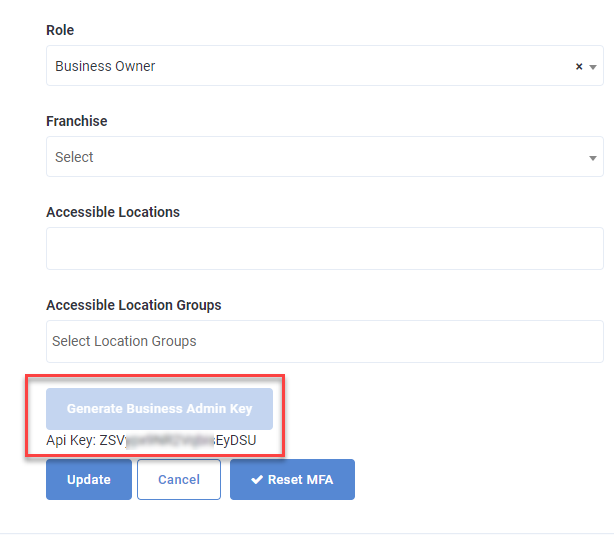
- Copy this key for configuration in the GoZone Platform to enable the Punchh Integration.
Contact your Punchh representative with any questions.
