Campaign Summary Report (formerly Campaign Type Metrics)
The Campaign Summary Report dashboard is the most detailed report to track the performance of your campaigns, including dozens of the most important KPI stats broken down by campaign type as well as individual campaigns. Filter your data to see what campaigns and gift types have been the most effective for your business, identify strengths and weaknesses in your campaign strategy, and take note of the trend line of selected attributes to gauge the trajectory of your efforts.
You can set the date range/durations to focus on and compare current and past time periods. Click a spot on the trend line to drill down further into a specific date, or click on an individual campaign or campaign type to view more detailed information. At any time, you can export the current Dashboard view by exporting to PNG, PDF, or PowerPoint and any selected data into a CSV or Text file.
The Campaign Summary Report dashboard cannot show gross spend, net spend, or redemption data for currency‑based campaigns because the system cannot reliably attribute how gifted currency is redeemed. When a guest receives a campaign credit in the form of currency, they may use it across multiple transactions or combine credits from different campaigns in a single redemption. Since there’s no accurate way to determine which portion of the redeemed amount came from which campaign, these metrics are excluded.
To view the Campaign Summary Report dashboard, navigate to Marketing Automation > Campaign Summary Report in the Punchh platform. The dashboard is split into two sections: Summary and Details. Campaign Summary provides an overview with a focus on trends over time. Campaign Details focuses on stats for individual campaigns along with links to each campaign's summary page.
Note: Campaign Summary Report data is refreshed daily.
Summary Dashboard
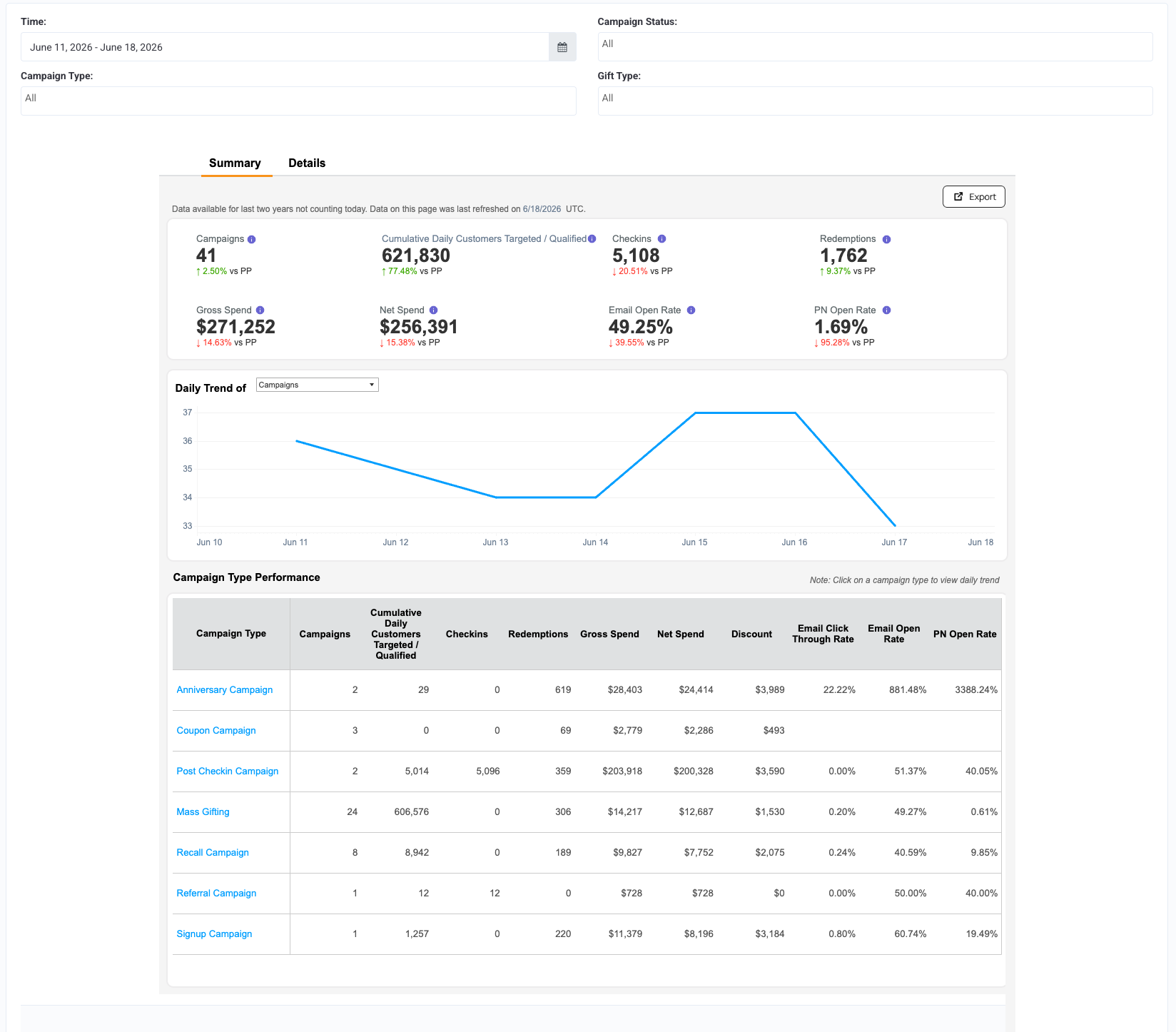
Use this dashboard to focus on summary stats to identify trends in the performance of all your campaigns and campaign types across a broader duration.
-
Set a Date Range and filter the data by Campaign Status, Campaign Type, and Gift Type.
-
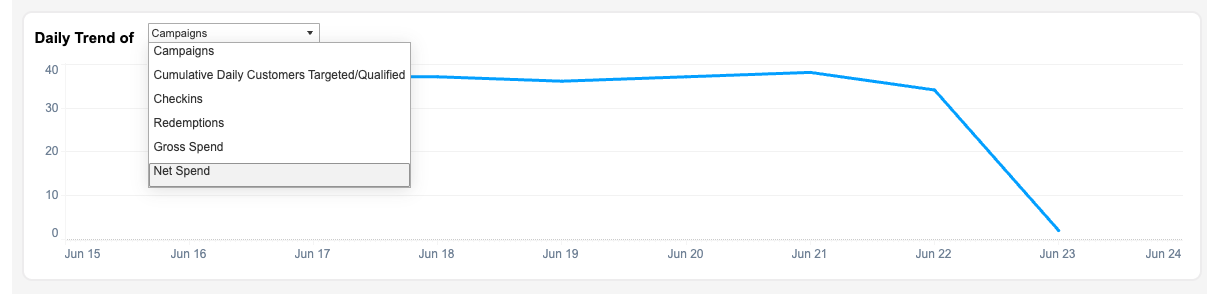
Switch between data attributes using the radio buttons under Select a View. Click a radio button to change the trend line graph to focus on Campaigns, Cumulative Daily Unique Customers Targeted / Qualified, Checkins, Redemptions, Gross Spend, and Net Spend.
-
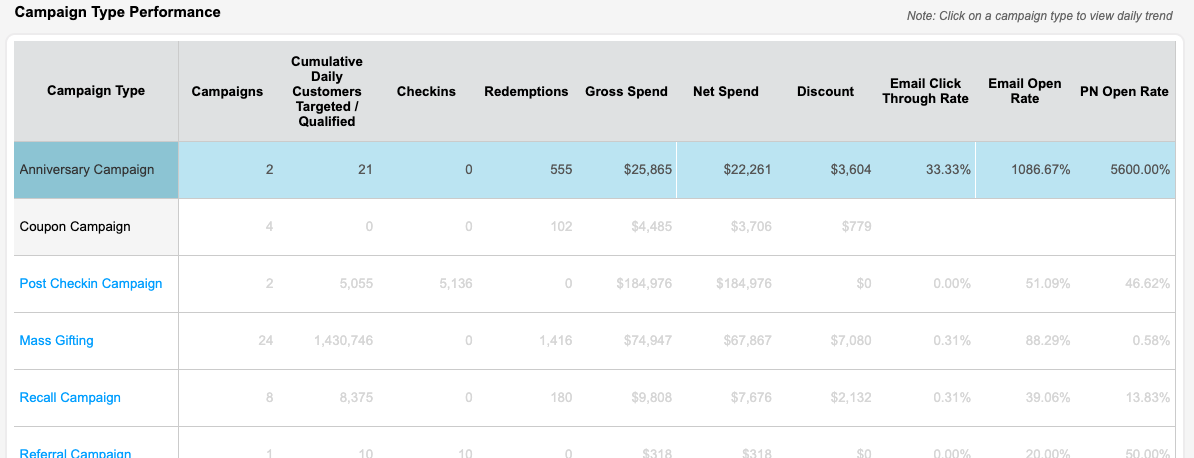
Click on a Campaign Type to change the trend line graph and KPI stats to reflect only campaigns of that type. Click it again to return to the overview.
High-Level Metrics
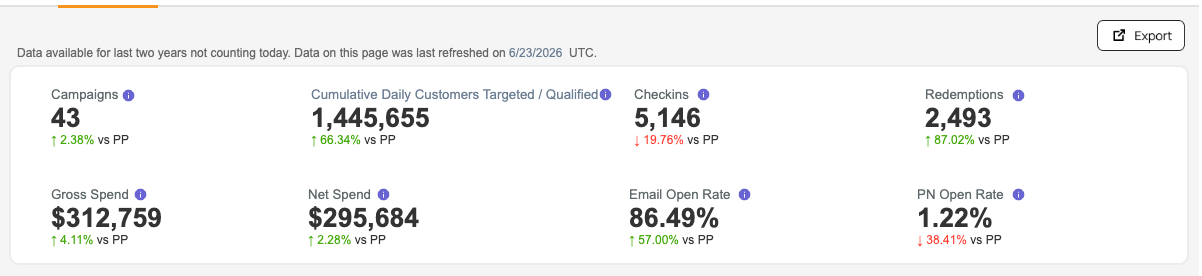
High-level campaign metrics are shown at the top of the dashboard and reflect the overall campaign metrics as well as the trend comparisons for the previous time periods (shown in parentheses), based on the date range and campaign types selected. Hover your mouse over each metric to view the date range of the previous time period that the trend comparison is measuring against.
Metrics Defined
| Metric | Definition |
|---|---|
| Campaigns | Total number of campaigns active in the selected duration, regardless of campaign start date/time. |
| Cumulative Daily Unique Customers Targeted / Qualified | Total number of guests targeted or qualified for the specified campaign. Number of users will be unique on daily level. This number may differ from a segment amount if some guests are unsubscribed from email or SMS communication, for example. |
| Checkins | The number of checkins recorded by campaigns in selected duration. Checkins can be loyalty or gift checkins, based on campaign type. |
| Redemptions | Number of processed campaign redemptions in the selected duration. |
| Gross Spend | Total spend by guests who have participated in campaign duration. It includes revenue generated from reward redemptions (Gross spend) and revenue from post-checkin campaigns. |
| Net Spend | Net spend by guests who have participated in campaign duration. It includes addition of revenue from post-checkin campaign and reward redemptions minus discount. |
| Email Open Rate | Percentage of email that are opened out of total number of email delivered by campaigns in selected duration. |
| PN Open Rate | Percentage of push notifications opened out of total number of push notifications delivered by campaigns, in the selected duration. |
Details Dashboard
Use this dashboard to focus on KPIs for individual campaigns or campaign types.
Note: In the details tab, for Lifetime Email Clicked, Lifetime Email Delivered, Lifetime Email Opened, and Lifetime Email Sent, the grand total currently displays the maximum value rather than the sum of all values. This behaviour is expected because the underlying data is stored in a way that results in the maximum value being returned.
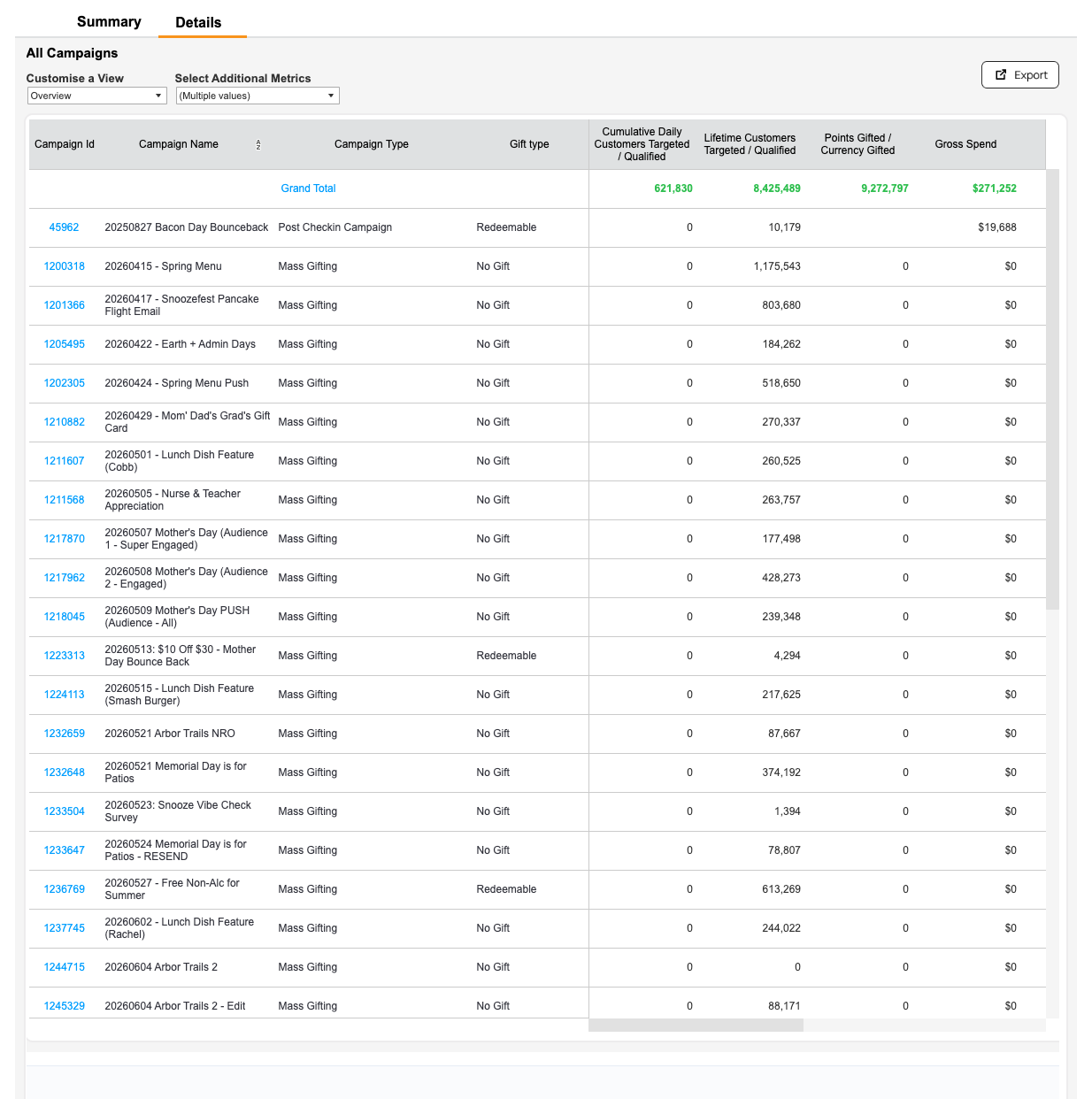
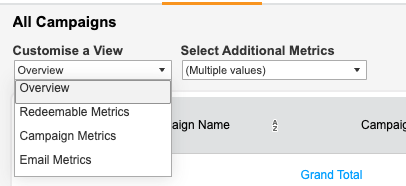
- Use the Additional Metrics dropdown to select which data types you want to display. Use the Customize View dropdown to change focus from a complete Overview to either Redeemable Metrics or Campaign Metrics or Email Metrics. Selecting Redeemable Metrics adds columns for Redeemable Name and Redeemable Type; Campaign Metrics adds columns for Campaign Start Date and End Date; Email Metrics adds columns for Campaign Start Date and End Date.)
- Click on a Campaign ID to open its corresponding campaign performance page in a new browser tab.
Download Campaign Data
You can export/download a snapshot of your current dashboard view at any time by clicking the Export button at the top right of the page. Select the file format you'd like to generate, and click Download to download the file to your computer.
- Image generates a PNG snapshot of the current dashboard tab.
- Data opens a new screen with populated data. From here you can download a text (CSV) file of the data list.
- Crosstab generates a CSV file of whatever cells you have selected (or all cells if none have been selected).
- PDF generates a PDF snapshot of the current dashboard tab.
- Powerpoint generates a PPTX deck with snapshots of both the current Summary and Details tabs as separate slides.
Dashboard Terms and Definitions
| Term | Definition |
|---|---|
| Additional Metrics | Allows user to toggle between different metrics available under the drop down menu |
| Campaign ID | Unique ID for a campaign. |
| Campaign Name | The name of the campaign. |
| Campaign Type | The type of campaign; Profile Update, Anniversary, Challenge etc. |
| Campaign Type Filter | Use the dropdown to filter your data by one or more campaign types; Mass Gifting, Recall, etc. |
| Campaigns | Total number of campaigns active in the selected duration, regardless of campaign start date/time. |
| Checkins | The number of checkins recorded by campaigns in selected duration. Checkins can be loyalty or gift checkins, based on campaign type. |
| Cumulative Daily Unique Customers Targeted / Qualified | Total number of guests targeted or qualified for the specified campaign. Number of users will be unique on daily level. This number may differ from a segment amount if some guests are unsubscribed from email or SMS communication, for example. |
| Date Range | Adjust the date range to confine your data to that duration. The default date range is the previous 1 month duration (last 30 days). End date is always a day before and start date is 30 days before from current date. |
| Discount | The total amount (value) of discounts recorded on receipts on which a redemption was processed. |
| Duration Comparison | Comparison of key attributes is done with the previous duration calculated based on date range selection. If 1 week is selected, it compares with previous week; if 1 month than with previous month and so on. Tooltip provides details of duration selected. |
| Earnable Amount | The total amount spent by guests, post discount, against a specified campaign (verified through checkins) that is eligible for loyalty earnings. |
| Email Click Through Rate | Percentage of emails clicked out of total number of emails delivered by campaigns, in selected duration. |
| Email Delivered | Total number of emails delivered out of total number of emails sent by campaigns, in selected duration. |
| Email Delivery Rate | Percentage of email that is delivered out of total number of email sent by campaigns in selected duration. |
| Email Open | Total number of emails opened out of total number of emails delivered by campaigns, in selected duration. |
| Email Open Rate | Percentage of email that is opened out of total number of email delivered by campaigns in selected duration. |
| Email Sent | Total number of emails sent by campaigns in selected duration. |
| End Date | Campaign end date (available under Campaign and Email Metrics View) |
| Gift Type | Type of gift attached to the campaign- redeemable, fixed points, variable points, etc. |
| Gift Type Filter | Different kinds of gift type can be selected from the dropdown. Ex: No Gift, Redeemable, Free points, etc. |
| Gross Spend | Total spend by guests who have participated in campaign duration. It includes revenue generated from reward redemptions (Gross spend) and revenue from post checkin campaign. |
| Lifetime Customers Targeted / Qualified | Total number of unique guests targeted or qualified for the campaign duration irrespective of the date range selected on the dashboard |
| Last Update | Data and time when last refresh was made |
| Lifetime Email Click Through Rate | Percentage of emails clicked out of total number of emails delivered by campaigns, regardless of the date range selected on the dashboard. |
| Lifetime Email Delivered | Total number of emails delivered out of total number of emails sent by campaigns, regardless of the date range selected on the dashboard. |
| Lifetime Email Delivery Rate | Percentage of emails delivered out of total number of emails sent by campaigns, regardless of the date range selected on the dashboard. |
| Lifetime Email Open Rate | Percentage of emails opened out of total number of emails delivered by campaigns, regardless of the date range selected on the dashboard. |
| Lifetime Email Opened | Total number of emails opened out of total number of emails delivered by campaigns, regardless of the date range selected on the dashboard. |
| Lifetime Email Sent | Total number of emails sent by campaigns, regardless of the date range selected on the dashboard. |
| Net Spend | Net spend by guests who purchased during the campaign duration. It includes addition of revenue from post checkin campaign and reward redemptions minus discount. |
| PN Open Rate | Percentage of push notifications opened out of total number of push notifications delivered by campaigns, in the selected duration. |
| PN Opened | Total number of push notifications opened out of total number of push notifications delivered by campaigns, in the selected duration. |
| PN Sent | Total number of push notifications sent by campaigns, in the selected duration. |
| Lifetime PN Open Rate | Percentage of push notifications opened out of total number of push notifications delivered by campaigns, regardless of the date range selected on the dashboard. |
| Lifetime PN Opened | Total number of push notifications opened out of total number of push notifications delivered by campaigns, regardless of the date range selected on the dashboard. |
| Lifetime PN Sent | Total number of push notifications sent by campaigns, regardless of the date range selected on the dashboard. |
| Points Gifted / Currency Gifted | The total sum of points or currency gifted from the specified campaign. |
| Redeemable Name | Name of redeemable attached to the campaign. |
| Redeemable Type | Type of redeemable attached to the campaign. Dollar or Percent off, Menu Ite Discount etc. |
| Redemption Amount | Reward amount that has been redeemed and used by guests or has been force-redeemed by business admins. |
| Redemptions | Number of processed campaign redemptions in the selected duration. |
| Rewards Disbursed | Number of redeemable rewards sent in the selected duration |
| Lifetime Redemption Rate | Percentage of processed redemptions out of total number of redeemable rewards sent by the campaigns, for the campaign duration, regardless of the date range selected on the dashboard |
| Start Date | Campaign start date (available under Campaign and Email Metrics View) |
| Select View | Default view is overview. Redeemable Metrics: Details of Redeemable - Name and Type gifted against each campaign Campaign Metrics : Campaign start date and end date to get better insights. Email Metrics : Campaign start date and end date to get better insights. |
| Status Filter | By default only those campaigns which are active and processed are selected |
| Trend Line Graph | Graph represents daily trend of each KPI selected. Graph can be clicked to check campaigns for specific date. Clicking on trendline will navigate to guest details page. |
Note: The mass gifting campaigns that were created before 2022-01-01 don’t have daily-level email data.
Included Campaign Types
The following are the campaign types that are included Campaign Summary Dashboard:
- Anniversary
- Challenge
- Checkin Survey
- Compression
- Coupon
- Location Presence
- Mass Gifting
- Post Checkin
- Profile Update
- Post Payment
- Post Redemption
- Promo
- Recall
- Referral
- Signup
- Social Cause
