Location
The Location tab contains sub-tabs that pertain to the specific location.
General
General settings related to the physical location and how information about the location is displayed throughout the POS system.
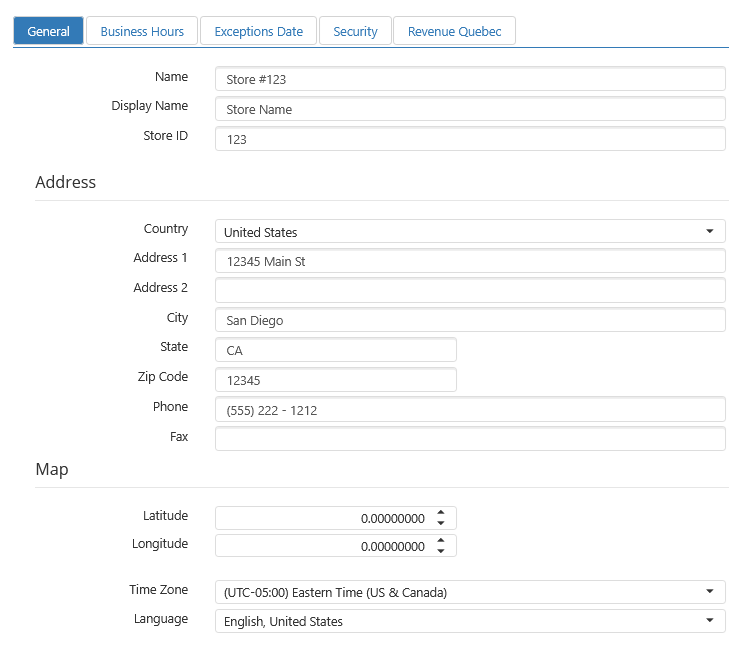
- Name: Printed at the top of the order receipt when no logo image is printed.
- Display Name: Name of the location as it appears in the reports and in the Customer Portal.
- Address: Address and phone number to be displayed on the order receipt and on the Customer Portal.
- Map: Coordinates are used to plot the location on a map in the Customer Portal and are used for the directions link included in order confirmation emails.
- Time Zone: Local time zone of the location's physical address.
- Language: The language the register will use for system screens, prompts, receipts, and register-generated reports. Currently, there are 2 languages to choose from:
- English
- French, Canada
Business Hours
Standard hours of operation of the location are used to validate future order request times.
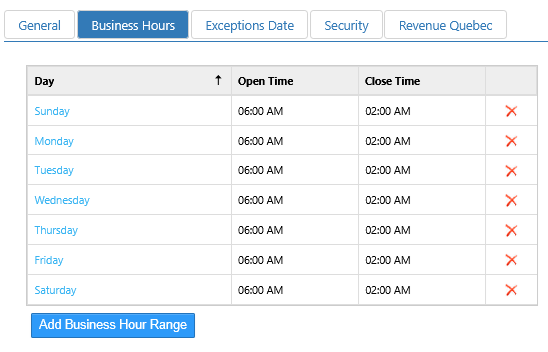
- Day: Day of the week.
- Open: Time of day the location opens for business.
- Close: Time of day the location closes for business.
Exception Dates
Dates that hours of operation that differ than what is defined on the Business Hours tab. Use for defining holiday hours or closures.
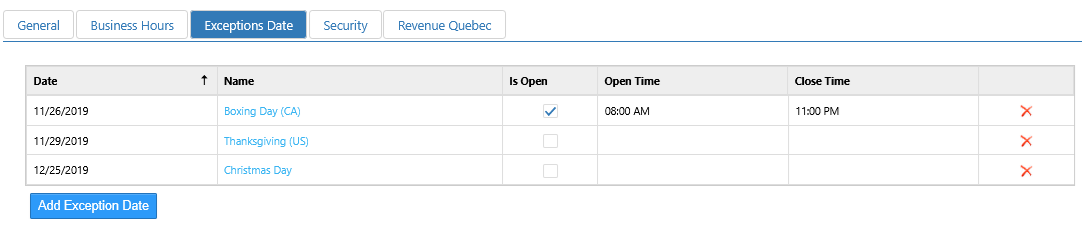
- Date: Date of the exception.
- Name: Name of the exception date.
- Is Open: Allows for open and close times.
- Opens: Time of day the location opens on the exception date.
- Closes: Time of day the location closes on the exception date.
Security
Settings that control security features for the location.

- Enable 3–12 Digit PIN: Sets the location to accept PINs of three to twelve digits in length for employee login instead of the standard four.
