Payment Devices
Important: If adding multiple payment devices, you may add ALL devices before saving changes.
PAR Pay Settings (5.0i+, updated 5.0L & 5.0m)
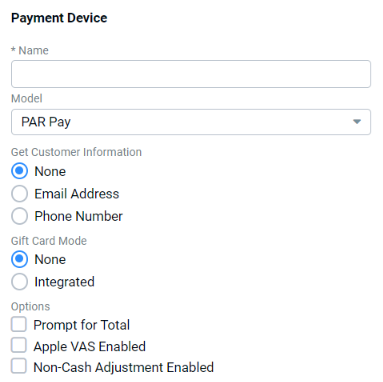
| Field | Description |
|---|---|
| Name | Customer preference |
| Model | PAR Pay |
| Get Customer Information | Phone Number (allows lookup of PAR POS Loyalty using the PAR Pay device) |
| Gift Card Mode | None: Select this option if there are no gift cards or if gift cards are processed on PAR POS. Integrated: Select this option if gift cards are processed through Par Pay. |
| Prompt for Total | Register displays a dialog with the total amount of the order, allowing employees to change the amount paid before conducting the transaction at the device |
| Apple VAS Enabled | Select if Apple VAS is available to use with the payment device |
| Non-Cash Adjustment Enabled | Check to charge guests the credit card processor interchange fee when paying with credit card |
| Enable Pre-Authorization (5.0m+) | Enables the server to initiate a pre-authorized charge on a guest's credit card. If selected, a "Minimum Pre-Authorization Amount" must also be entered. |
Pax PosLink Settings (5.0i+)
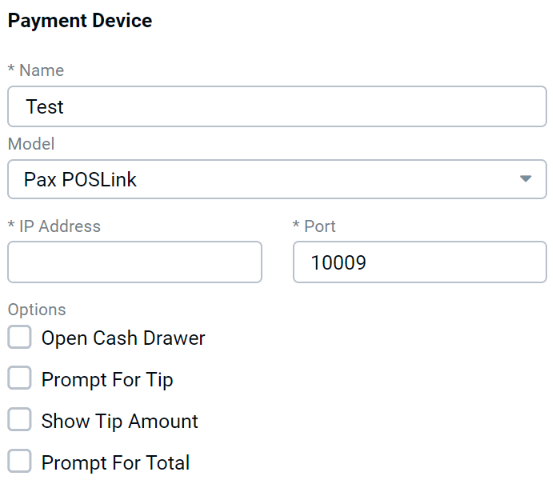
| Field | Description |
|---|---|
| Name | Customer preference |
| Model | Pax POSLink |
| IP Address | IP Address of payment device |
| Port | TCP Port the device listens to for incoming connections from the register |
| Open Cash Drawer | Cash drawer opens when tip is applied at the payment device |
| Prompt for Tip | Device prompts the customer to enter a tip amount |
| Show Tip Amount | When tip is applied at the payment device, displays the amount of the tip as a message on the register |
| Prompt for Total | Register displays a dialog with the total amount of the order, allowing employees to change the amount paid before conducting the transaction at the device |
Datacap US EMV Settings (5.0j+)
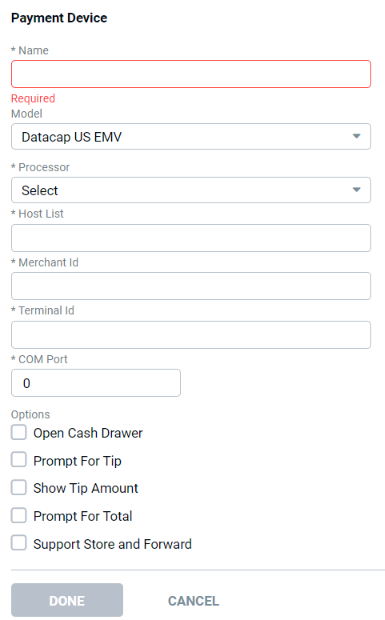
| Field | Description |
|---|---|
| Name | Customer preference |
| Model | Datacap US EMV |
| Processor | Backend credit card processor |
| Host List | Provided by processor |
| Merchant ID | Provided by processor |
| Terminal ID | Provided by processor |
| COM Port | ID unique to location, exposed for all Datacap payment devices; COM Port to which the device is physically connected |
| Open Cash Drawer | Cash drawer opens when tip is applied at the payment device |
| Prompt for Tip | Device prompts the customer to enter a tip amount |
| Show Tip Amount | When tip is applied at the payment device, displays the amount of the tip as a message on the register |
| Prompt for Total | Register displays a dialog with the total amount of the order, allowing employees to change the amount paid before conducting the transaction at the device |
| Support Store and Forward | If credit card terminal is offline, allows customer to still pay with a credit card - transactions are stored and forwarded for settlement when system is back online |
| Force Offline | Immediately puts terminal into "Store and Forward" mode |
| Maximum Number of Offline Transactions | Controls how many transactions are allowed while offline - any value between 1 and 9999 (default = 300) |
| Maximum Transaction Amount | Maximum amount allowed for an offline transaction (default = 500.00) |
Tender Retail Settings (5.0j+)
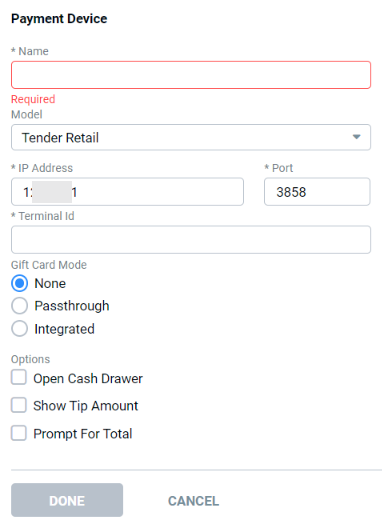
| Field | Description |
|---|---|
| Name | Customer preference |
| Model | Tender Retail |
| IP Address | IP address of the payment device |
| Port | TCP Port the device listens on for incoming connections from register |
| Terminal ID | Provided by processor |
| Gift Card Mode |
|
| Open Cash Drawer | Cash drawer opens when tip is applied at the payment device |
| Show Tip Amount | When tip is applied at the payment device, displays the amount of the tip as a message on the register |
| Prompt for Total | Register displays dialog with total amount of the order. Allows employees to change amount paid before conducting the transaction at the device |
Important Gift Card Processing Note:
For "Integrated" gift cards to work properly, the payment device itself must be configured to use the feature - refer to payment device instructions for configuration details (currently, this feature only works with ValueLink).
Elavon Settings (5.0j+)
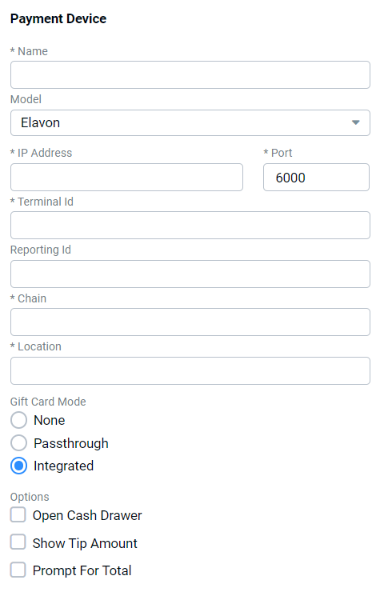
| Field | Description |
|---|---|
| Name | Customer preference |
| Model | Elavon |
| IP Address | Provided by processor |
| Port | Default = "6000" |
| Terminal ID | Unique by location, exposed for all Elavon devices |
| Reporting ID | Defined by customer, passed to Elavon when present (1-15 alpha-numeric) |
| Chain | Provided by processor |
| Location | Provided by processor |
| Gift Card Mode | Integrated |
| Open Cash Drawer | Cash drawer opens when tip is applied at payment device |
| Show Tip Amount | When tip is applied at the payment device, displays the amount of the tip as a message on the register |
| Prompt for Total | Register displays a dialog with the total amount of the order, allowing employees to change the amount paid before conducting the transaction at the device |
Datacap Canadian EMV Settings (5.0j+)
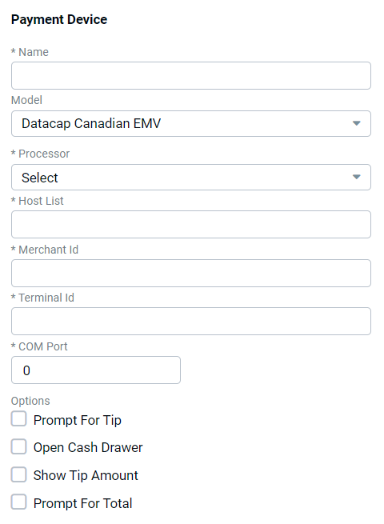
| Field | Description |
|---|---|
| Name | Customer preference |
| Model | Datacap Canadian EMV |
| Processor | Back end credit card processor |
| Host List | Provided by processor |
| Merchant ID | Provided by processor |
| Terminal ID | Unique by location, exposed for all Datacap payment devices |
| COM Port | COM Port the device is physically connected to |
| Prompt for Tip | Device prompts the customer to enter a tip amount |
| Open Cash Drawer | Cash drawer opens when tip is applied at payment device |
| Show Tip Amount | N/A |
| Prompt for Total | Register displays a dialog with the total amount of the order, allowing employees to change the amount paid before conducting the transaction at the device |
FreedomPay Settings (5.0j+, updated 5.0L)
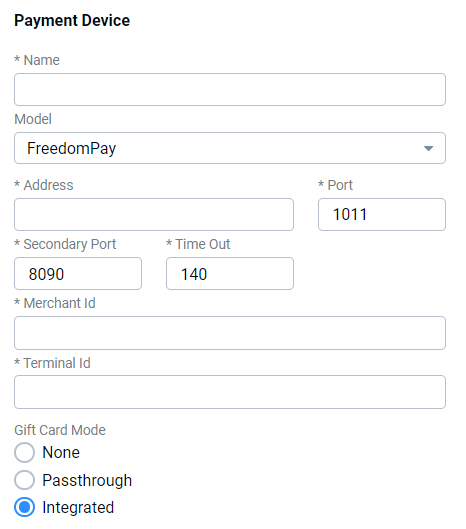
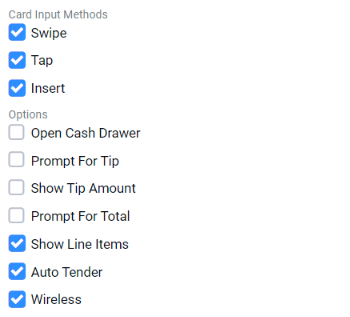
| Field | Description |
|---|---|
| Name | Customer preference |
| Model | FreedomPay |
| Address | Provided by processor |
| Port | Default = "1011" |
| Secondary Port | 8090 |
| Timeout | Configurable POS timeout in seconds (default = 95 seconds) |
| Merchant ID | Defined by FreedomPay |
| Terminal ID | Unique by location |
| Gift Card Mode | "Integrated" or "Passthrough" |
| Card Input Methods | Select all that apply |
| Open Cash Drawer | Cash drawer opens when tip is applied at payment device |
| Prompt for Tip | Device prompts the customer to enter a tip amount |
| Show Tip Amount | When tip is applied at the payment device, displays the amount of the tip as a message on the register |
| Prompt for Total | Register displays a dialog with the total amount of the order, allowing employees to change the amount paid before conducting the transaction at the device |
| Show Line Items | Displays order items on the payment device (if supported) |
| Auto Tender | Configuration to support multi-tender payment flows |
| Wireless | Identifies the payment device as "Wireless" - The system automatically requires a lane ID for credit card transactions when using a wireless device to ensure no payment device disruptions occur when processing payments |
Verifone Point Settings (5.0j+, updated 5.0L)
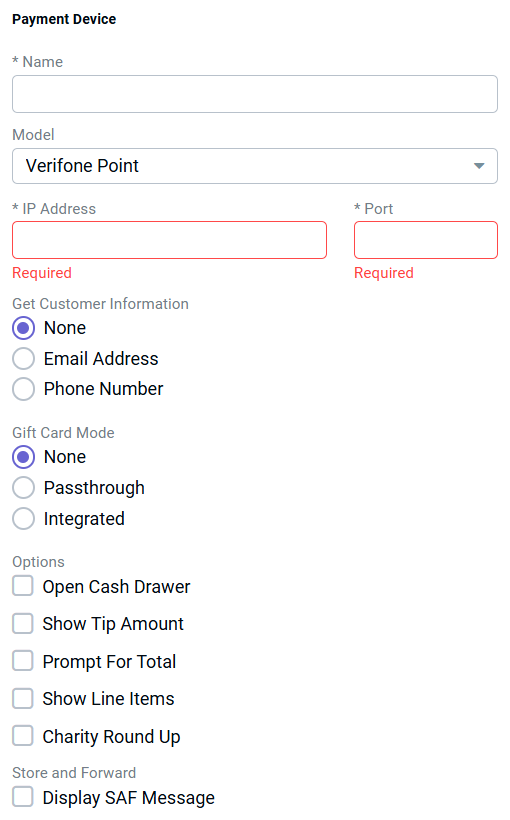
| Field | Description |
|---|---|
| Name | Customer preference |
| Model | Verifone Point |
| IP Address | Static IP Address of the payment device |
| Port | TCP Port the device listens on for incoming connections from register |
| Get Customer Information | Customer preference |
| Gift Card Mode | Customer preference - if "Passthrough" is selected, card reader acts as an MSR for gift card purchases and must be configured accordingly. Refer to payment device instructions for configuration details. |
| Open Cash Drawer | Cash drawer opens when tip is applied at payment device |
| Show Tip Amount | When tip is applied at the payment device, displays the amount of the tip as a message on the register |
| Prompt for Total | Register displays a dialog with the total amount of the order, allowing employees to change the amount paid before conducting the transaction at the device |
| Show Line Items | Only exposed when the device may be configured to show line items. When checked, items are displayed on the card reader screen as they are entered at the register. |
| Charity Round Up | When checked and charity Round Up is also configured in Settings Editor > Charities, the guest is prompted on the Payment Device to round up the payment for a Charitable Donation. |
| Display SAF Message | Displays a message when POS receives payment approval in offline mode (informational only) |
| SAF Message Interval | Desired interval for SAF Message display, in minutes |
Datacap Direct Settings (5.0L+)
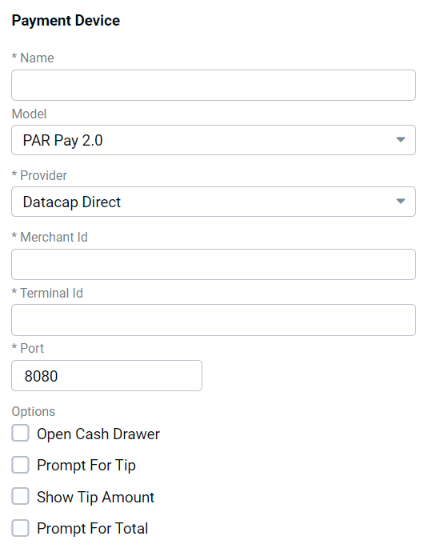
| Field | Description |
|---|---|
| Name | Customer preference |
| Model | PAR Pay 2.0 |
| Provider | Datacap Direct |
| Merchant ID | Provided by processor |
| Terminal ID | ID unique to location, exposed for all Datacap payment devices |
| Port | TCP Port the device listens to for incoming connections from the register |
| Open Cash Drawer | Cash drawer opens when tip is applied at the payment device |
| Prompt for Tip | Device prompts the customer to enter a tip amount |
| Show Tip Amount | When tip is applied at the payment device, displays the amount of the tip as a message on the register |
| Prompt for Total | Register displays a dialog with the total amount of the order, allowing employees to change the amount paid before conducting the transaction at the device |
