Loyalty Configuration
Important: Only one Loyalty integration may be configured on the POS at any time.
Paytronix Settings (5.0i+)
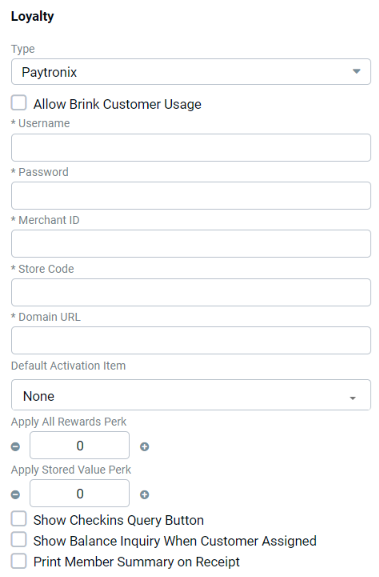
| Field | Description |
|---|---|
| Username | Provided by Paytronix |
| Password | Provided by Paytronix |
| Merchant ID | Provided by Paytronix |
| Store Code | Provided by Paytronix |
| Domain | Provided by Paytronix (typically https://api.pxsweb.com) |
| Default Activation Item | Item that triggers the activation of the customer account in Paytronix when ordered |
| Apply all Rewards | When configured, all rewards applicable are applied to the order automatically (must be configured with Paytronix and on the POS) |
| Apply Stored Value | When configured, available stored value is applied to the order automatically (must be configured with Paytronix and on the POS) |
| Show Checkins Query Button | Shows "Display Checkin" button on the Customer Lookup screen |
| Show Balance Inquiry when Customer Assigned | Displays stored value/gift card balance when customer is assigned to an order |
| Print Member Summary on Receipt | Prints the Paytronix loyalty summary on customer receipt |
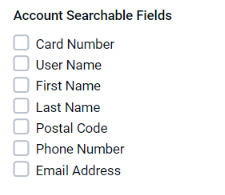
| Account Searchable Fields | Determines what type of loyalty lookup is displayed on Lookup screen - options are:
|
NCR Settings (5.0i+)
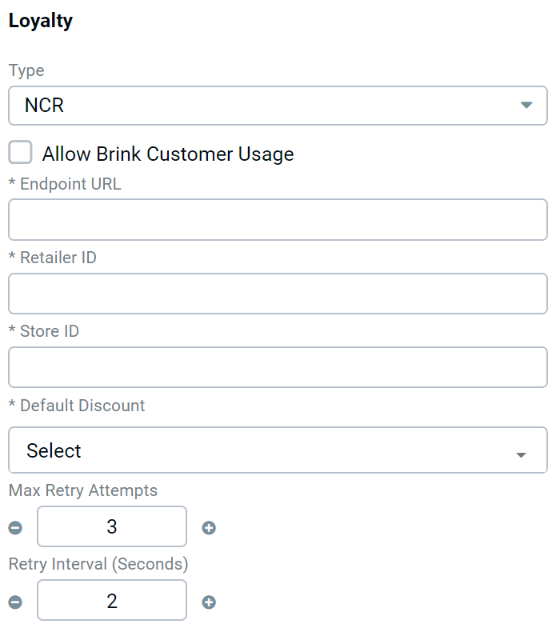
| Field | Description |
|---|---|
| Endpoint URL | Provided by NCR |
| Retailer ID | Provided by NCR |
| Store ID | Provided by NCR |
| Default Discount | MUST be selected and configured in Settings Editor > Discounts |
| Max Retry Attempts | Number of times the POS reached out to NCR Loyalty (default = 3) |
| Retry Interval Seconds | Time between retry attempts to reach out to NCR Loyalty (default = 2) |
SessionM Settings (5.0i+)
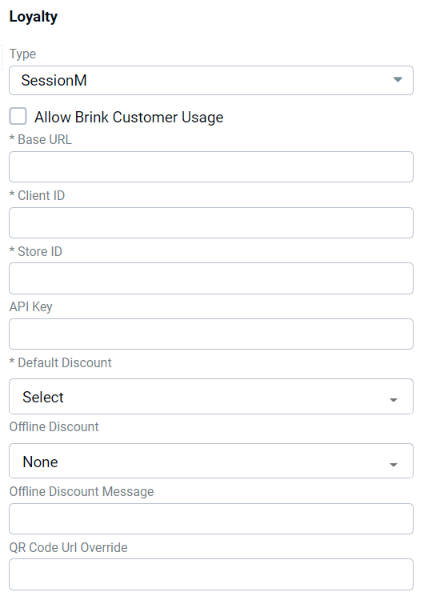
| Field | Description |
|---|---|
| Allow PAR POS Customer Usage | Allows non-PAR POS loyalty providers to utilize the PAR POS customer database. Note: In most cases, this box should be checked. If unchecked, contact a PAR POS integration technician for guidance |
| Base URL | Provided by SessionM |
| Client ID | Provided by SessionM |
| Store ID | Provided by SessionM |
| API Key | Provided by SessionM |
| Default Discount | Default discount for SessionM loyalty program. MUST be configured in Settings Editor > Discounts - "Must Enter Amount" and "Loyalty Discount" MUST be checked |
| QR Code URL Override | URL embedded in QR code printed on receipt (if blank, default = OrderID) |
Punchh Settings (5.0k+)
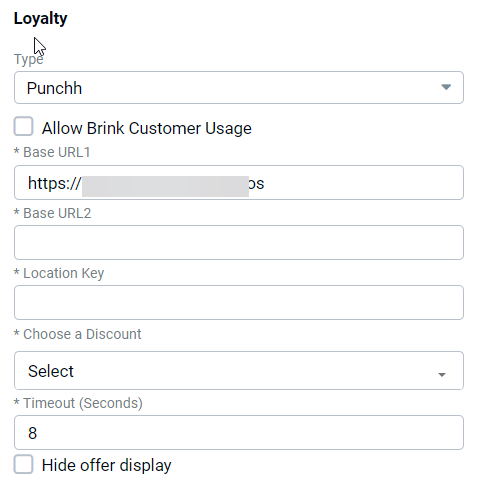
| Field | Description |
|---|---|
| Allow PAR POS Customer Usage | Allows non-PAR POS loyalty providers to utilize the PAR POS customer database. Note: In most cases, this box should be checked. If unchecked, contact a PAR POS integration technician for guidance |
| Base URL 1 | Provided by Punchh |
| Base URL 2 | Provided by Punchh |
| Location Key | Provided by Punchh |
| Choose a Discount | Choose desired discount from the dropdown. Important: To appear in the dropdown, discounts must be:
|
| Timeout (Seconds) | Timeout period if Punchh cannot be reached (default = 8) |
| Hide offer display | Prevents the offer display screen from automatically displaying when customer scans QR code for identification |
Punchh 2.0 (5.0m+)
Punchh 2.0 redefines the redemptions protocol. It streamlines the redemption process by permitting multiple discounts in a single transaction and addresses some feature gaps to ensure a best-in-class integration.
NOTE: Coordinate with your PAR and Punchh Customer Success Representatives to activate this integration.
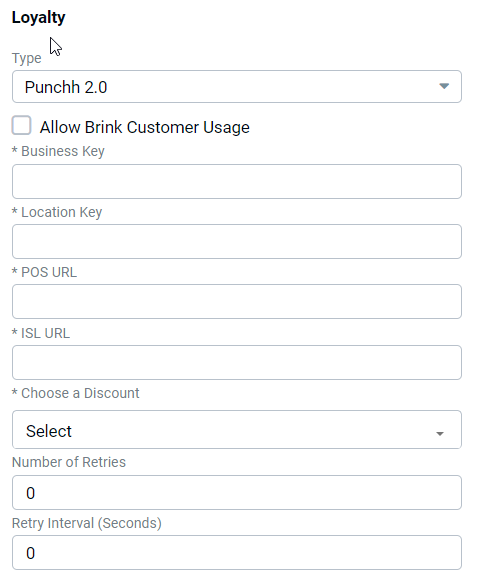
| Field | Description |
|---|---|
| Allow PAR POS Customer Usage | Allows non-PAR POS loyalty providers to utilize the PAR POS customer database. Note: In most cases, this box should be checked. If unchecked, contact a PAR POS integration technician for guidance |
| Business Key | Provided by Punchh |
| Location Key | Provided by Punchh |
| POS URL | Provided by Punchh |
| ISL URL | Provided by Punchh |
| Choose a Discount | Choose desired discount from the dropdown. Important: To appear in the dropdown, discounts must be:
|
| Number of Retries | Number of times the POS is allowed to retry a connection with Punchh |
| Retry Interval (seconds) | Time between retry attempts to reach out to Punchh Loyalty |
Heartland Settings (5.0k+)
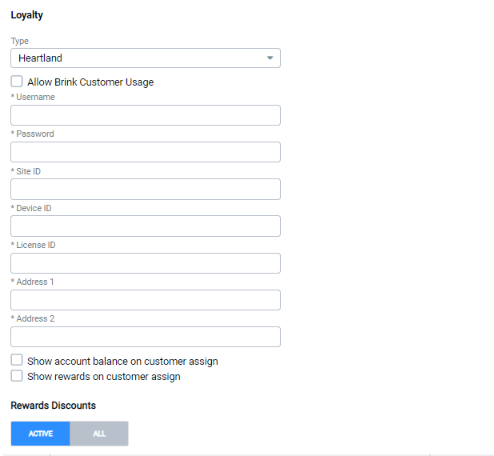
| Field | Description |
|---|---|
| Allow PAR POS Customer Usage | Allows non-PAR POS loyalty providers to utilize the PAR POS customer database. Note: In most cases, this box should be checked. If unchecked, contact a PAR POS integration technician for guidance |
| Username | Provided by Heartland |
| Password | Provided by Heartland |
| Site ID | Provided by Heartland |
| Device ID | Provided by Heartland |
| License ID | Provided by Heartland |
| Address 1 | Provided by Heartland |
| Address 2 | Provided by Heartland |
| Show account balance on customer assign | Displays Heartland stored value balance on the dialog that displays when a customer is assigned to an order |
| Show rewards on customer assign | Shows rewards available for redemption when customer is assigned to an order |
| Rewards Discounts | Discounts that are available for point redemption.
|
Givex Settings (5.0k+)
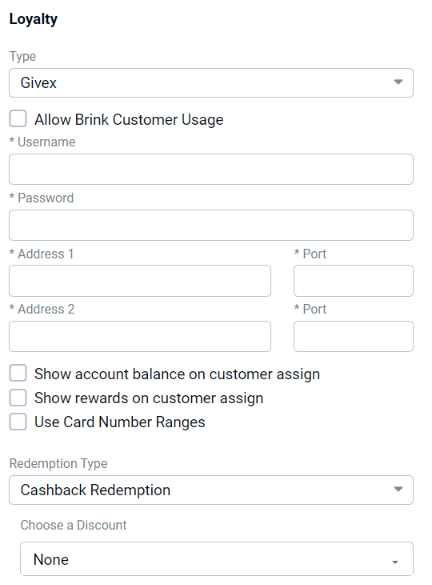
| Field | Description |
|---|---|
| Allow PAR POS Customer Usage | Allows non-PAR POS loyalty providers to utilize the PAR POS customer database. Note: In most cases, this box should be checked. If unchecked, contact a PAR POS integration technician for guidance |
| Username | Provided by Givex |
| Password | Provided by Givex |
| Address 1 | Provided by Givex |
| Port | Provided by Givex |
| Address 2 | Provided by Givex |
| Port | Provided by Givex |
| Show account balance on customer assign | Register displays account balance dialog when customer is assigned to an order |
| Show rewards on customer assign | Register displays rewards available for redemption dialog when customer is assigned to an order |
| Use Card Number Ranges | Range of loyalty card numbers that can be validated by the system |
| Redemption Type |
|
| Choose a Discount | Loyalty discounts available already configured in Settings Editor |
Beanstalk Settings (5.0k+)
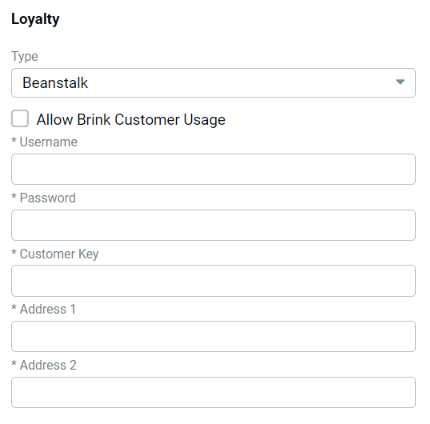
| Field | Description |
|---|---|
| Allow PAR POS Customer Usage | Allows non-PAR POS loyalty providers to utilize the PAR POS customer database. Note: In most cases, this box should be checked. If unchecked, contact a PAR POS integration technician for guidance |
| Username | Provided by Beanstalk |
| Password | Provided by Beanstalk |
| Customer Key | Provided by Beanstalk |
| Address 1 | Provided by Beanstalk |
| Address 2 | Provided by Beanstalk |
