Sales by Destination Report
The Sales by Destination report displays net and gross sales for the reporting period broken down by destination (as configured on the Destinations page in Settings Editor). It is run by going to the Administrator Portal:
Reports > Sales Summaries > Sales By Destination
Example Sales by Destination report
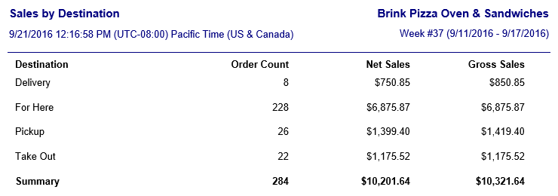
| Field | Description |
|---|---|
| Destination | The destination that the sales data refer to. |
| Transactions | The number of orders and other paid transactions that occurred for the destination, with a total for the reporting period at the bottom. |
| Gross Sales | The total gross sales for the destination, with a total for the reporting period at the bottom. |
| Net Sales | The total net sales for the destination, with a total for the reporting period at the bottom. |
