How Do I Checkout a Register?
Open the Manage Drawers Menu
-
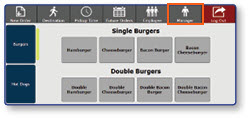
Once logged in to the register, select the Manager button.
-
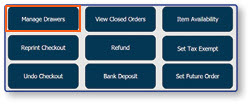
Select Manage Drawers
Complete Drawer Checkout
-
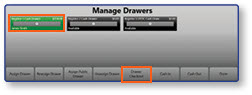
Select the drawer you wish to check out
-
Select Drawer Checkout
-
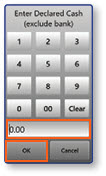
In the Declared Cash pop-up window, enter the amount of cash in the drawer
-
Select OK
Note: Once the Drawer Checkout is complete, a Drawer Checkout Report will be printed. This report includes sales payment information and any shortages or overages found in the drawer total.
