UPOS PLU Report
The POS Revenue Details report (RDC_UPOSPLU_Rpt) displays sales as a total, by account, revenue center, order type, category and day part.
Any columns not showing information may not have that information provided by the POS and therefore cannot be reported by DC. Additionally, to provide the data to Data Central, the POS Item need to be linked to DC Item in Sales Item Linking.
Parameters
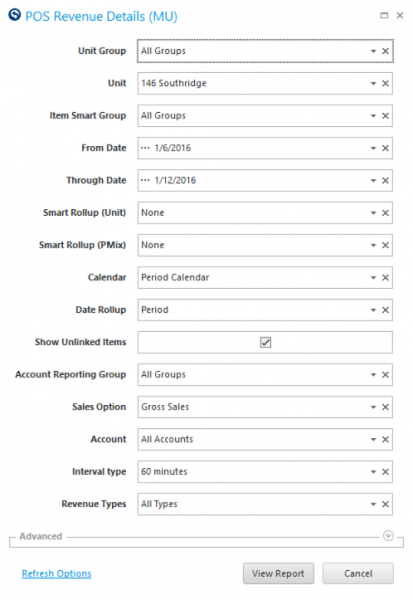
- Unit Group: Select Unit Group to view.
- Unit: Select Unit to view.
- Item Smart Group: Select the Item Group to view.
- From Date : Select Start Date to view from.
- Thru Date: Select End Date to view thru.
- Smart Rollup Group (PMIX): Select the PMIX Group to view.
- Smart Rollup (Unit): Select the level for data to roll-up based on the Smart Group hierarchy associated with the Unit Group field. None will show unit detail without the ability to organize by group.
- Calendar: Select the calendar to use.
- Date Rollup:
- Business Date: Show data by business date, sub period, period and sum total.
- Sub Period: Show data by sub period, sub period and sum total.
- Period: Show data by period and sum total.
- Sum All: Show data as a sum total ONLY.
- Show Unlinked Items: Put check in the box to view items that are not linked in POS Item Linking. This can be very helpful in seeing items that are sold, but not correctly linked in Sales Item Linking.
- Account Reporting Groups: Select the Account Reporting Group to view.
- Sales Option: Gross or Net Sales (setup in POS Category Linking, Revenue tab).
- Account: Select the account to view.
- Interval Type: 15 min, 30 min, 60 min.
- Category Type: All, Revenue, Deferred Revenue, Other (setup in POS Category Linking, Revenue tab).
Quick Note: If Sold Qty is placed within the table, not the totals column, it will often show only a value of 1, even when multiples are sold, because the items are sold by the each. To see the total sold quantity, it is best to place it in the totals column by placing it in the Data area for the Pivot table.
This report is helpful to correlate POS Items to RMDC items for sales item linking. The PLU Code, UM, and POS Item name can help you correctly identify the item to link. Additionally, you can summarize sales by account, item, POS category or even server.