Close Period Report
The Auto-Close Current Store Period Report (ClosePeriod_Rpt) can be run to close one or more periods for Units.
Parameters
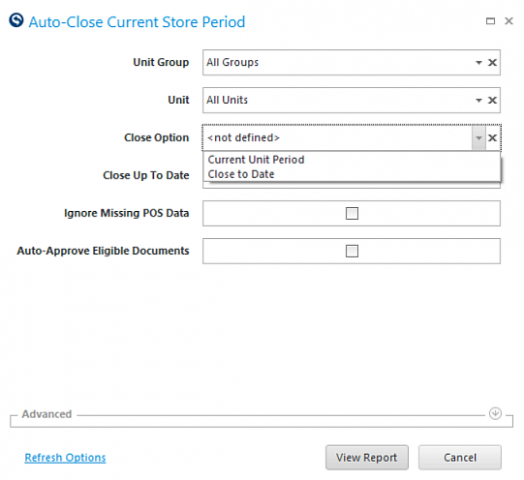
- Unit Group: select a unit group to close a period for multiple units belonging to a group.
- Unit: select a Unit to close.
- Close Option: select either Current Unit Period or Close to Date.
- Close Up To Date: enter the date to close to if Close to Date was selected for the Close Option field.
Quick Note: Entering a date that falls within a period closes the period, it does not close just up to that date.
- Ignore Missing POS Data: check this option to ignore missing POS data.
- Auto-Approve Eligible Documents: check this option to auto-approve eligible documents.
Report
The report will either confirm a successful close of the period or note issues to be resolved to close the period.
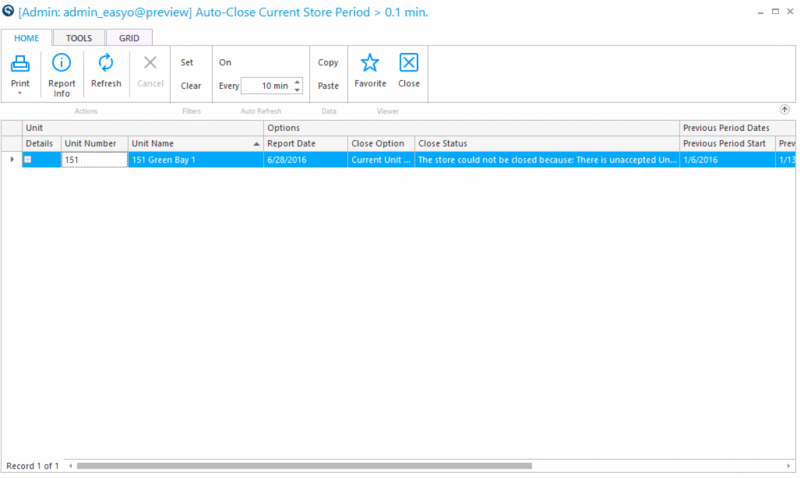
For Example: There is an unapproved trade for the unit prohibiting the period from closing. To review all items to approve to close the period, launch the Approve for Accounting activity.
Quick Note: It is important to realize that an unapproved trade may not be able to be approved by your Unit if the trade that is not accepted is for an item you traded out to another unit and they have not yet accepted the trade. Work with the Administrator at your company to coordinate approvals in situations like this.