Inventory Worksheet With Previous Counts Report
Use this report to print and enter inventory counts by location. This report includes the ability to view previous counts, as they could be used as a measure against your current counts. Use this report to view the previous counts on the Inventory Count Worksheet.
Parameters
- Count Date: Enter the date to count.
- Location: Enter the location(s) to count.
- Smart Filter: Select All items, only estimated items, only counted items, or only not counted items.
- Print Empty: Select to view this report without counts.
- Include Daily: Put a check in this box to include the option of daily counts as the potential previous counts value.
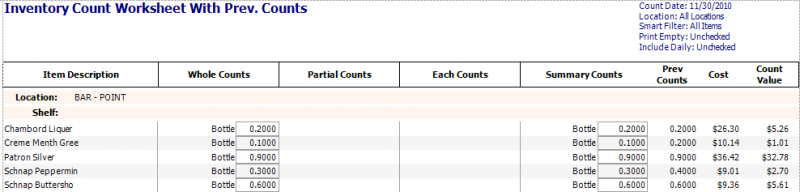
Columns
- 'ITEM DESCRIPTION' column: Local Description for Unit level report; Master Description for MU and Admin report.
- 'WHOLE COUNTS' column: Whole Count Measure and count value entered.
- 'PARTIAL COUNTS' column: Partial Count Measure and count value entered.
- 'EACH COUNTS' column: Each Count Measure and count value entered.
- 'SUMMARY COUNTS' column: Summary Count Measure and count value calculated from the whole, partial and each count values entered.
- 'PREV COUNTS' column: Prev counts from the last count.
- 'COST' column: Cost for the summary measure for the inventory date selected using the selected costing method from the Item Master (FIFO, Last Cost, Weighted Average).
- 'COUNT VALUES' column: = Summary Count Value x Cost