POS Modifiers Report
The POS Modifiers report displays purchase details including modifiers on purchases. If prices do not look correct on inventory sheets, use this report to verify the purchases history and confirm that the item was invoiced correctly.
Parameters
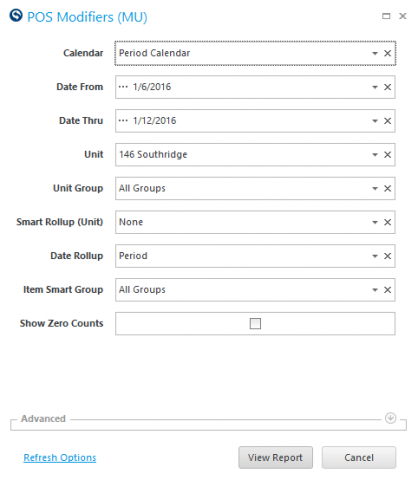
- Calendar: Select the calendar to use.
- Date From: Select Start Date to view from.
- Date Thru: Select End Date to view thru.
- Unit: Select Unit to view.
- Unit Group: Select Unit Group to view.
- Smart Rollup (Unit): Select Unit Group to view.
- Date Rollup: Select the Date Rollup that you would like to view.
- Business Date: Show data by business date, sub period, period and sum total.
- Sub Period: Show data by sub period, sub period and sum total.
- Period: Show data by period and sum total.
- Sum All: Show data as a sum total ONLY.
- Item Smart Group: Select the Item Group to view.
- Show Zero Counts: Check the box to display zero counts.
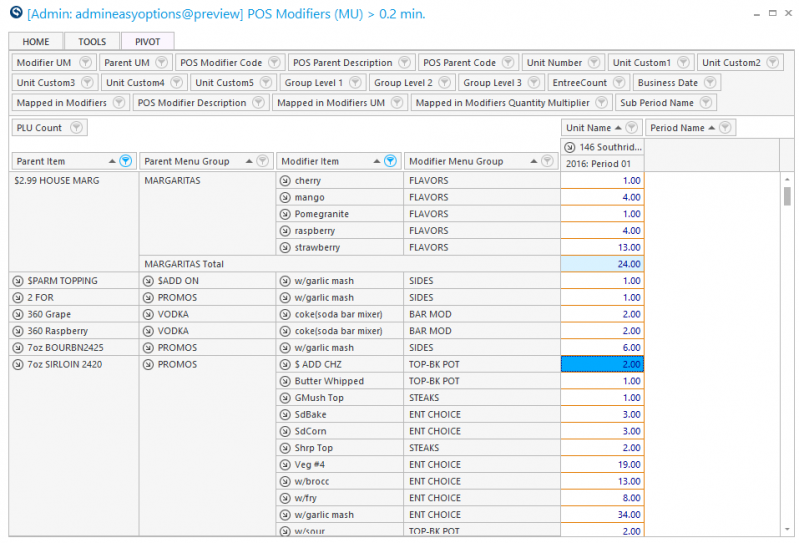
The POS must send over information for parent/modifier relationships for this report to receive information. It will list modifiers applied to any item sold in the selected time frame. To look at exact details of what items were used in any modifier, you should review details of the Item/Recipe Utilization (MU) report (RDC_ItemRecipeUtilization_Rpt).