Yumpingo Platform API Implementation
The Yumpingo integration harnesses the functionality of the Punchh Platform APIs. These APIs enable the following features in the Yumpingo Platform:
- Syncing locations from Punchh to Yumpingo - Get Locations List
- Checking if the user is enrolled in loyalty - Get User Information
- Creating E-Club Users - eClub Guest Upload
- Injecting Custom Segments into the Punchh Platform - Create a Custom Segment
- Adding New Users to Custom Segments - Add User to a Custom Segment
- Getting a list of available Redeemables - Get Reedemable List (may change to Dashboard Meta in the future)
- Gifting Loyalty Users Redeemables - Support Gifting to a User
Requirements
Please reach out to your Punchh representative to enable the setup and configuration.
To enable the creation of segments and gifting from within the Yumpingo Platform, a Punchh Platform Administrator must provide Yumpingo with a Business Admin Key to authenticate all Punchh Platform API requests.
If the Punchh Dashboard Administrator’s account is disabled, it will invalidate the Business Admin Key. It is strongly recommended that the Business Admin Key is set up using a generic account specific to the integration e.g. yumpingo-admin@brand.com and not tied to a specific user. This generic email address will also be reflected in the Audit logs for any related activity. If the Business Admin Key is re-generated by the admin in Punchh, the current key will no longer pass validation, this will break the integration between the Yumpingo and Punchh.
Setup and Configuration
Step 1.
Contact your Punchh representative to have the "Enable Offer distribution from external system" setting enabled, if not already enabled.
Step 2.
To use the Platform APIs, the Brand's admin will need to generate a Business Admin Key in the Punchh Platform. To set the Business Admin Key, please follow the steps below:
- Go to Administration> All Users, Rolls and Permissions > Admins.
- Select the admin user's account with appropriate permissions from the list.
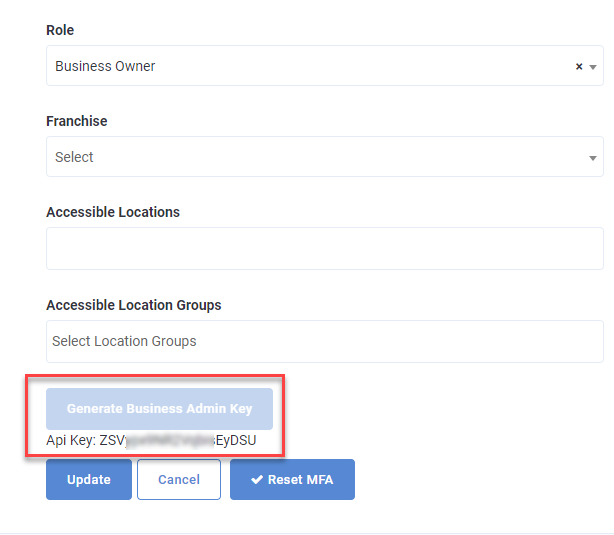
- Click the Generate Business Admin Key button at the bottom of the page.
- Copy this key for configuration in the Yumpingo platform to enable the Punchh Integration.
Step 3.
Send the Business admin key to onboarding@yumpingo.com with the Subject: "CLIENT NAME: Punchh Business Admin Key." The onboarding team will configure the Punchh Business Admin Key in the Yumpingo Platform to enable the integration.
If the Generate Business Admin Key button is missing this is likely due to one or more of the following:
- The Role assigned to the admin does not have the ‘Dashboard API’ access permission enabled or Business Manager/Owner settings enabled.
- The Role assigned to the admin does not have the Business Manager/Owner settings enabled.
Yumpingo does not currently support segment deletion via API. Segments that are not associated with distribution via campaign or gifting can be deleted directly in the Punchh Platform. If a segment is utilized in the distribution of marketing or gifts, the segment cannot be deleted.
