Google Tag Manager - Custom Events
What is it?
Google Tag Manager is a feature that allows you to identify events on your Marketing Website based on their kind. It means that depending on the attributes of those events, you can draw differences between them.
What does it do?
This feature expands the options currently presented by the website. It helps to increase the amount and kind of information about how Users interact with the marketing website - so it gives more details about the customer journey. It is an improvement to your knowledge about your customers.
How do I get it?
It requires you to have GTM (Google Tag Manager) ID associated with your marketing website.
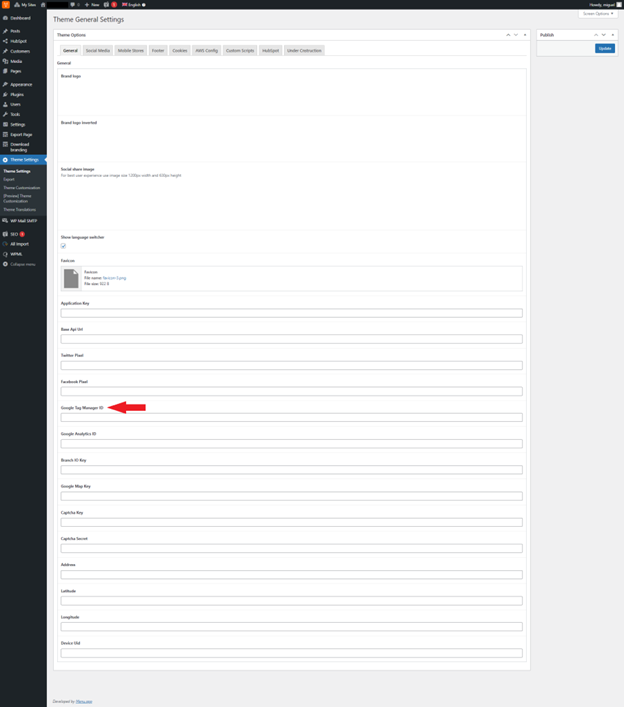
The field where you have to add the Google Tag Manager ID on your website is here:
-
On your marketing website, go to Theme, then Settings, then General. Here, you will spot the Google Tag Manager ID field:
-
This field has been added so that if you have interest in collecting such type of data. You can enter the exact name that you want this data collection event to have - it will then be reflected in the GTM panel.
And so, an additional field will be displayed in the CMS when this component is added. You can specify the name of the event that will be triggered when the User interacts with certain components of your website.
For example: if user clicks on a certain link, GTM will record this information and present it in the GTM panel.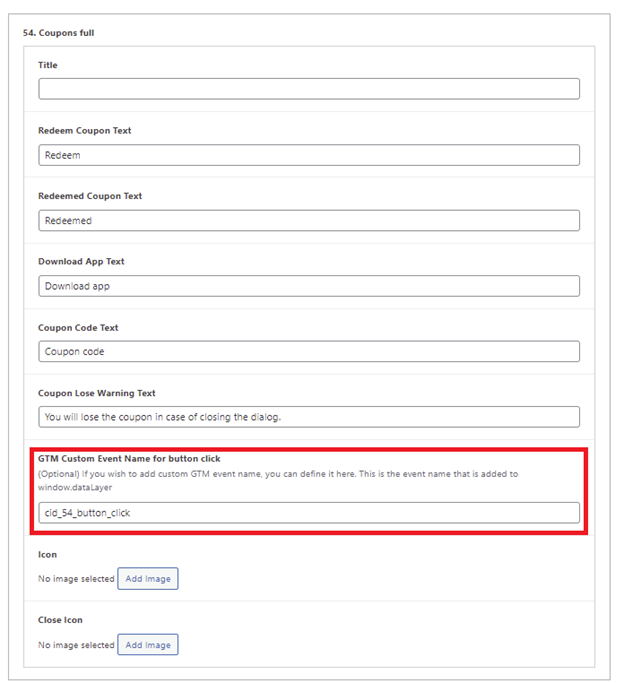
-
Here's the list of components that present this option and the action that it executes:
Id and Name Supported GTM events (dfault names) 1. Carousel medium cards Image Hover:
'cid_1_image_hover'
Each slide2. Benefits Button Click: 'cid_2_button_click' 3. Footer (template set in theme customisation) nav_footer_logo
nav_footer_home_solutions
nav_footer_home_success-stories
nav_footer_home_insights
nav_footer_solutions_branded-apps
nav_footer_solutions_menu-link
nav_footer_solutions_delivery-dispatch
nav_footer_solutions_loyalty-discounts
nav_footer_solutions_marketing-website
nav_footer_solutions_engagement
nav_footer_solutions_management-center
nav_footer_solutions_integrations
nav_footer_success-stories_success-stories
nav_footer_insigths_insigths
nav_footer_about_menu-crew
nav_footer_about_careers
nav_footer_social_linkedin
nav_footer_social_youtube
nav_footer_social_instagram
nav_footer_social_facebook
nav_footer_bottom_imprint
nav_footer_bottom_privacy-policy
nav_footer_bottom_support4. Card grid smaller Button Click: 'cid_4_button_click'
Image Hover:
'cid_4_image_hover'5. Features Section Vertical Button Click: 'cid_5_button_click'
Image Hover:
'cid_5_image_hover'6. Features Cards Grid Button Click: 'cid_6_button_click'
Image Hover:
'cid_6_image_hover'7. Share social media Button Click: 'cid_7_button_click'
Image Hover:
'cid_7_image_hover'
Each item8. Carousel Gallery Button Click: 'cid_8_button_click'
Image Hover:
'cid_8_image_hover'
Each slide9. Carousel small cards Button Click: 'cid_9_button_click'
Image Hover:
'cid_9_image_hover'
Each Slide10. Job popup description Button Click: 'cid_35_button_click' (cid 10 is a part of cid-35) 11. Content block tagline Button Click: 'cid_11_button_click' 12. Content block button group Button Click: 'cid_12_button_click' 13. Content block title Button Click: 'cid_13_button_click' 14. Complex header Button Click: 'cid_14_button_click' 15. Small Products Grid Button Click: 'cid_15_button_click' 16. Horizontal Timeline 17. Items list Button Click: 'cid_17_button_click' 18. Content block Button Click: 'cid_18_button_click' 19. Contact form section Button Click: 'cid_19_button_click' 20. Locations 21. Grid card vertical Image Hover:
'cid_21_image_hover' Button Click: 'cid_21_button_click'22. Grid card horizontal Image Hover:
'cid_22_image_hover' Button Click: 'cid_22_button_click'23. Home hero section Button Click: 'cid_23_button_click'
Image Hover:
'cid_23_image_hover'
Each slide24. Services grid Button Click: 'cid_24_button_click' 25. Coupon grid card Button Click: 'cid_25_button_click'
Image Hover:
'cid_25_image_hover'26. Customers header Button Click: 'cid_26_button_click'
Image Hover:
'cid_26_image_hover' - Each image27. All integrations sliders Button Click: 'cid_27_button_click'
Image Hover:
'cid_27_image_hover' - Each image28. Articles large small Button Click: 'cid_28_button_click'
(For featured article and for each small article)
Image Hover:
'cid_26_image_hover' - (For featured article and for each small article)s29. Trending Button Click: 'cid_29_button_click' (view all)
Image Click: 'cid_29_button_click' + targetUrl
Image Hover: 'cid_29_image_hover'+ targetUrl30. Integrations header Image Hover:
'cid_30_image_hover'31. Bordered text block Button Click: 'cid_31_button_click' 32. Integrations Button Click: 'cid_32_button_click' Image Hover:
'cid_23_image_hover'
Each Item33. Large title Button Click: 'cid_33_button_click' 34. Team Image Hover:
'cid_34_image_hover'
Each Image35. SAGE HR Button Click: 'cid_35_button_click' 36. Articles horizontal Button Click: 'cid_36_button_click'
Image Hover:
'cid_36_image_hover'37. Article contents table Button Click: 'cid_37_button_click' each tab 38. Card grid larger Button Click: 'cid_38_button_click'
Image Hover:
'cid_38_image_hover'39. Carousel small items Button Click: 'cid_39_button_click' 40. Carousel cta large Button Click: 'cid_40_button_click'
Image Hover:
'cid_40_image_hover'
Each slide41. Tabs block Button Click: 'cid_41_button_click'
Image Hover:
'cid_41_image_hover'42. Pop up with content 43. Product carousel Button Click: 'cid_43_button_click'
Image Hover:
'cid_43_image_hover'
Each slide44. Articles vertical Button Click: 'cid_44_button_click'
Image Hover:
'cid_44_image_hover'
Each slide45. Grid Cards Heading Button Click: 'cid_45_button_click' Image Hover: 'cid_45_image_hover' 46. Features section sides Button Click: 'cid_46_button_click'
Image Hover:
'cid_46_image_hover'47. Grid cards Button Click: 'cid_47_button_click'
Image Hover:
'cid_47_image_hover'
Each card48. Articles small image Button Click: 'cid_48_button_click'
Each card49. Articles medium vertical Button Click: 'cid_49_button_click'
Image Hover:
'cid_49_image_hover'50. Integrations left-right cards Image Hover:
'cid_50_image_hover'
Each image51. Lightbox Button Click: 'cid_51_button_click'
Image Hover:
'cid_51_image_hover'52. Home locations Image Hover: 'cid_52_image_hover'
Button Click: 'cid_52_button_click' + resourceAddress (when address is selected)53. Contact Form Button Click: 'cid_53_button_click' 54. Coupons Full Button Click: 'cid_54_button_click' + resourceId + resourceName (click on Redeem button)
Button Click: 'cid_54_button_click' + resourceId + resourceName + couponMethod (click on Mobile App or Redeem Coupon button)
Button Click: 'cid_54_button_click' + resourceId + (click on coupon tab)55. Home Apps Button Click: 'cid_55_button_click' + targetUrl 56. Coupons Button Click: 'cid_56_button_click' (view all)
Image Click: 'cid_56_button_click' + resourceId
Image Hover: 'cid_56_image_hover'+ resourceId57. Youtube 58. Button Button Click: 'cid_58_button_click' 59. Content Grid Simplified Button Click: 'cid_59_button_click'
Image Hover:
'cid_59_image_hover'
Each image60. Posts grid image left Button Click: 'cid_60_button_click'
Image Hover:
'cid_60_image_hover'
Each post61. Sitemap Button Click: 'cid_61_button_click' + targetUrl 62. 404 Button Click: 'cid_62_button_click' 63. Zendesk (Next only) 64. small image cards Button Click: 'cid_64_button_click'
Each card65. Grid Boxed items Button Click: 'cid_65_button_click'
Each card66. New component - dupiclate id 29 67. Imprint 68. advantages-list 69. tagline with icon 71. New component (article page) Button Click: 'cid_71_button_click' each tab 73. New component (article page) 74. accordion Button Click: 'cid_74_button_click' + resourceName
