Mobile: App Icon & Application Stores Previews
App Icon
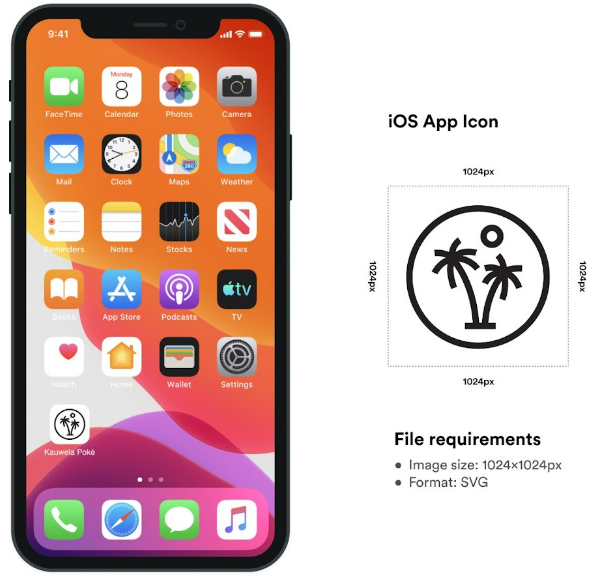
App Icon is used for app representation on the Home Screen, in Notifications, Settings, Search and in the App/Play/Huawei Store. Best practice is to use a brand logo or the illustration that represents your brand.
iOS
Requirements
- Icon size: 1024x1024px
- Format: SVG
- Naming
.svg
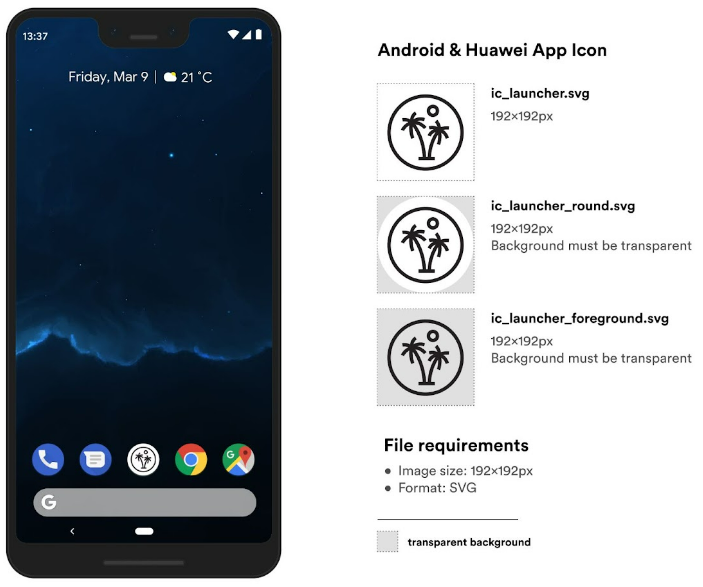
Android & Huawei
Requirements
- Icon size: 192x192px
- Three files
- Format: SVG
- Naming is defined in the image
Application Stores Previews
The App Store and the Play Store/App Gallery images are used to showcase the functionality of the app in the store.
- For the App Store, there are two image sizes. One for the new generation of iPhone devices as the iPhone X or higher, and the other for the older generation of iPhone devices as the iPhone 8.
- For the Play Store/App Gallery, there is only one image size for previews and one additional Feature graphic image.
We are providing templates so you can easily create your own App store preview images.
Requirements
| Format | Store type | Image size |
|---|---|---|
| PNG | App Store | for iPhone X, XS, 11 Pro… - 1242x2688px iPhone SE, 6s, 7, 8… - 1242x2208px |
| Play Store App Gallery |
1080x1920px Feature graphic - 1024x500px |
Naming: You can name them as you wish, but please put the order number in so we know in which order images will be shown in the store.
App Store (iOS)
Play Store (Android) / App Gallery (Huawei)
