Members and Permissions
The Customization Center uses role-based access to control what team members can do and which sets they can reach. This article covers the two available roles for brands, their permissions, and how to invite and remove members.
Roles
There are two roles in the Customization Center:
| Role | Description |
|---|---|
| Customizer | Access to the sets they have been invited to |
| Customizer (can invite) | Same access as Customizer, plus the ability to invite and manage other members |
Note: Both roles are scoped to specific sets. You only have access to the sets you are assigned to.
Permissions
| Action | Customizer | Customizer (can invite) |
|---|---|---|
| Edit translations | ✓ | ✓ |
| Edit customizations (colors, typography, assets, and more) | ✓ | ✓ |
| Manage set languages | ✓ | ✓ |
| Publish translations and branding | ✓ | ✓ |
| Invite, manage, and remove team members | ✗ | ✓ |
Note: You can publish only on sets you are assigned to.
Inviting Members
Note: Only Customizers with the Can invite permission can invite new members to a set.
To invite a member to a set:
-
Click Settings > Members.
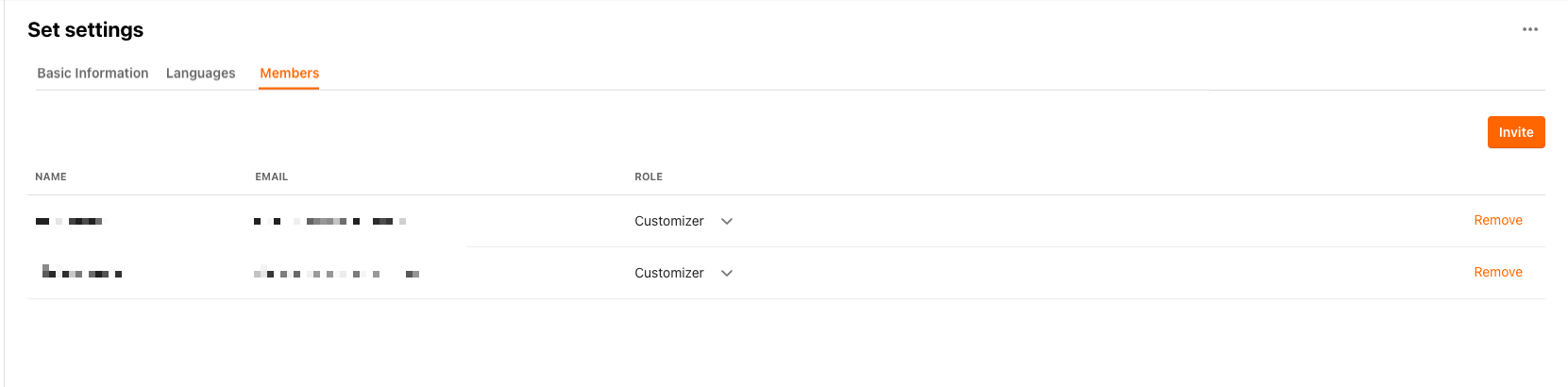
- Click Invite.
- In the Invite window, complete the following fields:
- Email: enter the email address of the person you are inviting
- Role: select one of the following:
- Customizer: standard access to the set
- Customizer (can invite): standard access plus the ability to invite and manage other members
- Select Invite.
The invited user receives a magic link email to complete their registration and access the set.
If the invited user already has a Customization Center account, the new set is added to their existing account and they are notified by email. If they do not have an account yet, they receive an invitation to complete registration.
Removing Members
Note: Customizers with the Can invite permission can remove other members from a set.
To remove a member from a set:
- Click Settings > Members.
-
Select Remove next to the member's name.

- In the confirmation dialog, select Remove.
Note: If a removed member is not assigned to any other sets, their account is deactivated. If they are still assigned to other sets, only their access to the specific set is removed.
Managing the Can Invite Permission
The Can invite permission is set when you invite a user to a set. You can update it after the user has already joined.

- This permission is defined per set. A user may have it for one set but not another.
- Any Customizer with the Can invite permission can update this role for other members in the same set.
Notification Emails
Members recienve notification emails with the following details:
- Features where all strings are new or changed
- Features with updated strings in the core language
- An Open Customization Center button that takes you directly back to the Customization Center
NEW Tags
When you open the Customization Center from a notification email, features and strings that changed or were added are marked with a NEW tag.
- Selecting a feature with the NEW tag opens it in the main view and clears the tag.
- The tag also clears if the feature is scrolled to the top of the main view and stays there for more than a second.