How to View Orders for Menu V2
With the transition to Menu V2, orders have moved from the CMS to the Management Center. Follow these steps to locate and manage order details:
Key Notes:
- Order details are only available at the store level.
Steps to Access Order Details:
- Navigate to the Management Center.
- Select: Store > Orders > Overview.
Data Refresh
The data is near real time live. The page will update automatically every 5 minutes.
Filters

Channel
The platform or medium through which the order was placed, such as:
- Mobile App
- Web app
- In-Store Kiosk
- Third-Party Delivery Partner
Order Type
Filter orders specific to order channels, such as
- Dine-In (Full-Service or Quick-Service)
- Takeout
- Delivery (1st and 3rd party delivery)
- Curbside Pickup
- Catering (Delivery or Pickup)
Payment Method
The payment type used by the customer, such as:
- Credit/Debit Card
- Mobile Payment (e.g., Apple Pay, Google Pay)
- Gift Card
- Cash
Order Status
The current status of the order, including:
- Placed: order has been placed and in the POS.
- In Preparation: Being prepared within the kitchen.
- Ready: Order have been prepared and waiting for collection.
- Completed: Order successfully fulfilled.
- Cancelled: Order cancelled by the customer or store.
- Refunded: Order refunded partially or fully.
There is also a search bar where you can quickly search for specific order ID or by customer emails.
Orders Overview
The Orders Overview provides a detailed summary of customer transactions, enabling businesses to efficiently track and manage order data. It includes key customer and order-specific details, ensuring transparency and enhancing customer service operations.
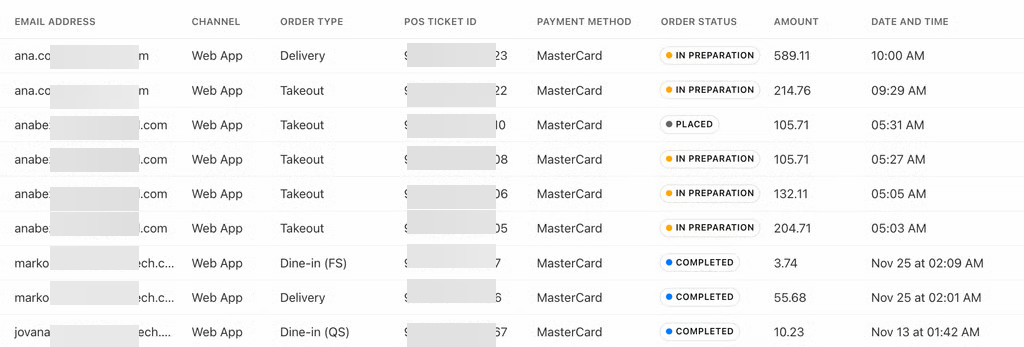
Fields and Descriptions
- Order Number
- A unique identifier for each order, used for tracking and referencing.
- Customer (Name)
- The full name of the customer who placed the order.
- Email Address
- The customer's email address, enabling communication for updates, confirmations, or support.
- Channel
- The platform or medium through which the order was placed, such as:
- Mobile App
- Web app
- In-Store Kiosk
- Third-Party Delivery Partner
- The platform or medium through which the order was placed, such as:
- Order Type
- The type of order, such as:
- Dine-In (Full-Service or Quick-Service)
- Takeout
- Delivery (1st and 3rd party delivery)
- Curbside Pickup
- Catering (Delivery or Pickup)
- The type of order, such as:
- POS Ticket ID
- A unique identifier generated by the POS system to track transactions within the restaurant's system.
- Payment Methods
- The payment type used by the customer, such as:
- Credit/Debit Card
- Mobile Payment (e.g., Apple Pay, Google Pay)
- Gift Card
- Cash
- The payment type used by the customer, such as:
- Order Status
- The current status of the order, including:
- Placed: order has been placed and in the POS.
- In Preparation: Being prepared within the kitchen.
- Ready: Order have been prepared and waiting for collection.
- Completed: Order successfully fulfilled.
- Cancelled: Order cancelled by the customer or store.
- Refunded: Order refunded partially or fully.
- The current status of the order, including:
- Amount
- The total monetary value of the order, including taxes, tips, and any applicable discounts.
- Date and Time
- The exact date and time the order was placed, providing visibility into peak hours and patterns.
