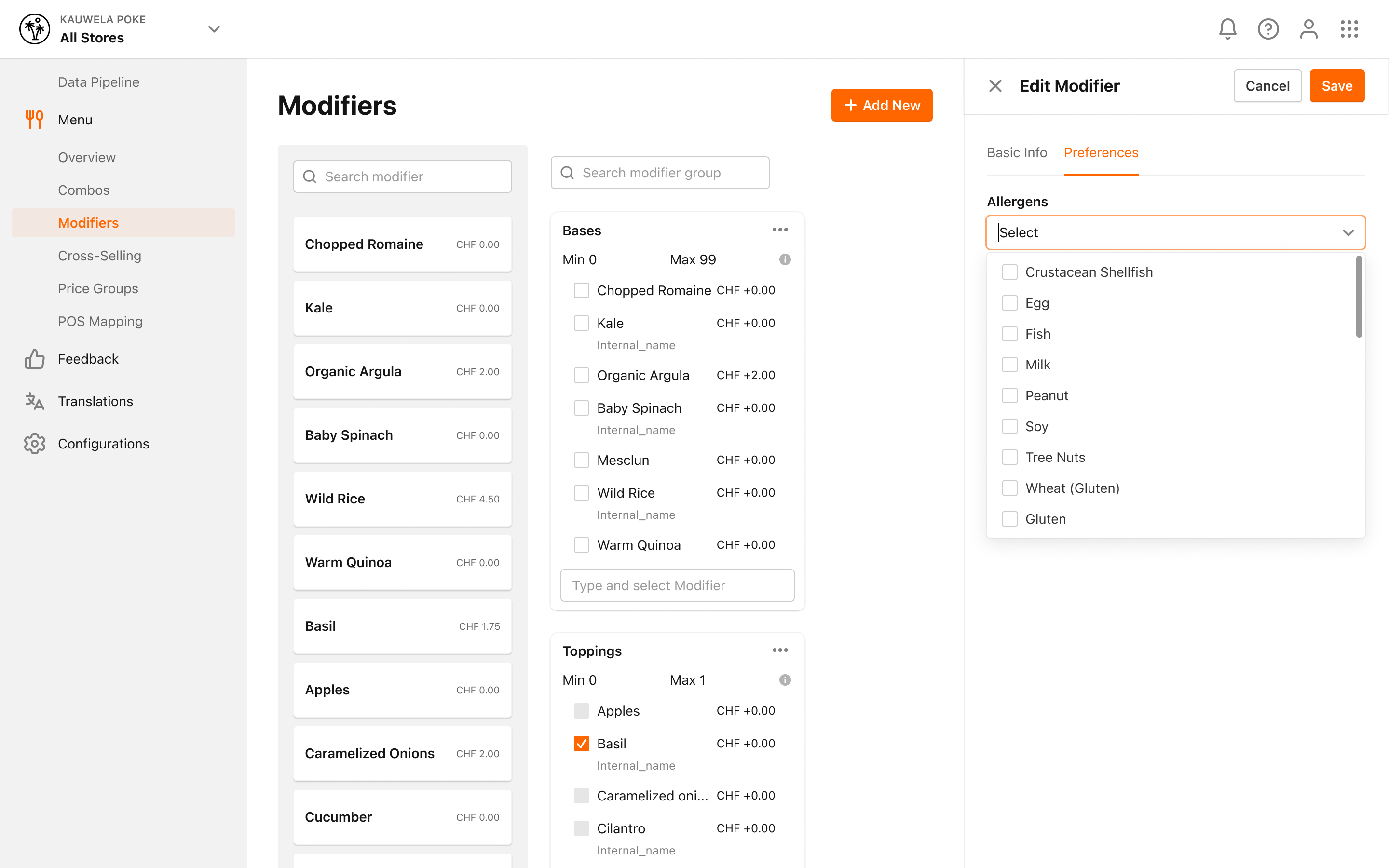
How to Manage Allergens for Modifier?
| User Role | Store Group | Store |
|---|---|---|
| Brand Manager | ✅ | ❌ |
| Area Manager | ✅ | ❌ |
| Store Manager | ❌ | ❌ |
You can add Allergens to a Modifier, which will be shown to customers across all channels when the Modifier is ordered.
To manage Allergens for a Modifier:
-
Click on Modifiers in the left navigation bar
-
Modifiers page appears
-
Locate the Modifier
-
Click on the three dots for the Modifier
-
Click on Edit
-
In Edit Modifier form, click on the Preferences section
-
A new modal is displayed with all available Allergens
- If any Allergens are already added to the Modifier, they will be displayed as enabled
-
Enable/disable Allergens from the modal
-
The added Allergens will be shown in the Allergens section of the Edit Modifier form
-
Click Save to save your changes for the Modifier