Free Modifier Functionality (PAR POS)
Overview
Free Modifier Functionality adds a free selection allowance to modifier groups - for example, "Cheese (0 out of 1 Free remaining)." Customers see upfront how many selections are covered and which ones will cost extra, with prices updating as they make choices. Free selections are applied in the order they are made - the first N choices are free, and anything beyond that shows the configured price.
This configuration is managed in the modifier group settings in the Management Center and applies automatically across web and mobile ordering channels.
Prerequisites
Before modifier counts appear in your Ordering experience, make sure the following is in place:
- PAR POS integration: Free counts are sourced from your POS configuration via PAR POS modifier group setup. If your POS is not configured correctly, free count data will not be available.
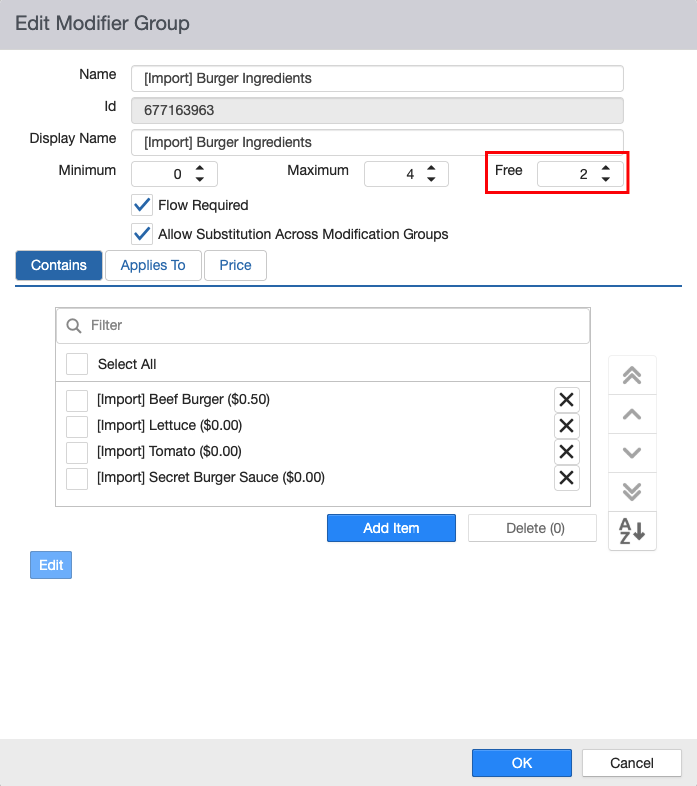
Accessing Free Modifier Settings
To view or edit the free count for a modifier group:
- Navigate to your brand in the Management Center.
- Select Product Groups under the Menu section.
- Open the relevant modifier product group group.
- Locate the Free Count field in the modifier group settings.
To view the free count after a POS import:
- Navigate to Management Center.
- Select Menu Preview.
- Open any item and select a modifier group card to see the free count applied.
Free Count Configuration
The free count field defines how many selections from a modifier group are included at no charge, regardless of whether those modifiers carry a price. The field is editable, giving you flexibility to adjust the value directly in Management Center without going back to your POS.
| Field | What It Does |
|---|---|
| Free Count | Sets how many selections from this group are included at no charge. Groups with no free count configured behave as standard — all priced modifiers display their price. |
The free count value should match what is configured in PAR POS. If the two values are out of sync, pricing at the point of sale can behave unexpectedly. If you import the free count and later run change the POS configuration, the imported value must be manually changed to match the POS one.
Ordering Experience
The free count surfaces automatically on web and mobile ordering channels when a value greater than zero is configured on a modifier group.
Web & Mobile: Additional Details
When a customer opens an item, modifier groups with a free count display the allowance in the group label — for example, "Cheese (up to 2 free selections included)." Groups without a free count set display normally with no label.
A live counter tracks remaining free selections as the customer makes choices. Once the allowance is reached, further selections display their configured price.
| Selection State | What the Customer Sees |
|---|---|
| Within free allowance | No price displayed |
| Beyond free allowance | Modifier price displayed |
At cart and checkout, modifiers selected within the free allowance appear without a price. Selections beyond the free count display their individual price. The order total reflects only the chargeable selections.
Selection order determines what's free — not price. The first N modifiers a customer selects are treated as free. There is no logic to automatically minimize the customer's total.
Scope of Application
The free modifier count applies to all ordering channels where the feature is supported. In the current release, this includes:
- Web ordering
- Mobile ordering
Marketplace integrations (PAR LINK) and Kiosk are not included in this release. Support for both is planned for a future release.
