Plate Menu Cost Analysis Report
The Plate/Menu Cost Analysis report displays menu items along accompanying additional items sold, and if these added items added cost or not.
Parameters
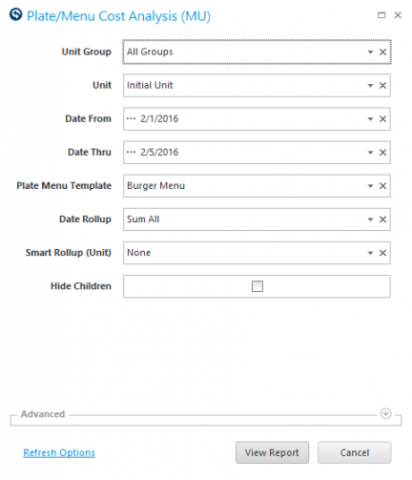
- Unit Group: Select Unit Group to view.
- Unit: Select Unit to view.
- Date From: Select Starting Date to view.
- Date Thru: Select Ending Date to view thru.
- Plate Menu Template: Select the template from the drop down menu.
Quick Note: The list shows templates entered in the Plate Menu Costing activity.
- Date Rollup: Select the level to drill down date information (None, Period, Sub Period or Sum All).
- Smart Rollup (Unit): Select the level for data to roll-up based on the Smart Group hierarchy associated with the Unit Group field. None will show unit detail without the ability to organize by group.
- Hide Children: Put a check to hide children item details.
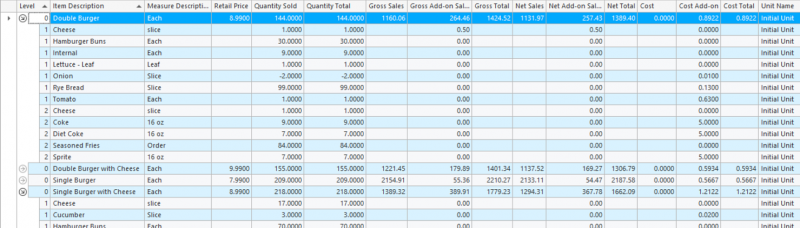
The Quantity Sold column can help you track sales of an item as well as it's sides. Running the report across multiple days and looking at quantity sold for an item, it may be easy to see which days an item sells.
Additional Columns Found In The Column Chooser:
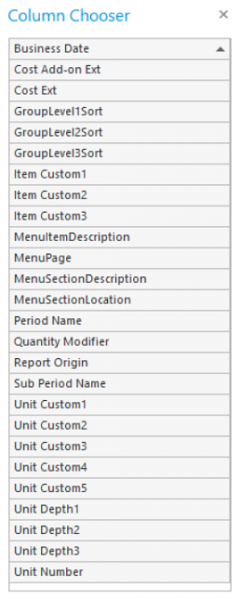
Quick Note: If you have Modifiers defined in Q-Factors and Modifier Scaling, they are shown in the Quantity Modifier column instead of the Quantity Sold column.