Daily Summary Business Calc Recalc Report
The Force Recalculation Utility Report (Daily Business Summary Cal Recalc Report) is used to update and review accounts posted using the Calculations activity. It should be run after changes to calculations or the addition of new calculations. It also should be run when the Inventory Frequency is changed for a restaurant.
Parameters
- Unit Group: Select Unit Group to view.
- Unit: Select Unit to view.
- From Date: Select Start Date to recalculate.
- Through Date: Select End Date to recalculate.
- Action: Select Show dates needing recalculation, Recalculate by calculation name, or recalculate by account name.
- Calculation: Select the calculation to recalculate.
- Account: Select the account to recalculate.
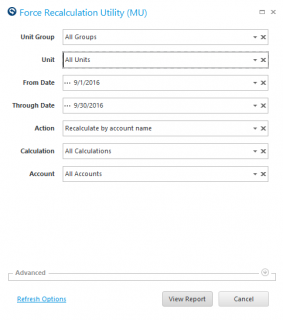
Options For The Action Field:
- Show Dates Needing Recalculation: Use this action to review account posting data.
- Recalculate By Calculation Name: Use this action in conjunction with the Calculation parameter to define which Calculation(s) you wish to update or review.
- Recalculate By Account Name: Use this action in conjunction with the Accounts parameter to define which Account(s) you wish to update or review.
Report
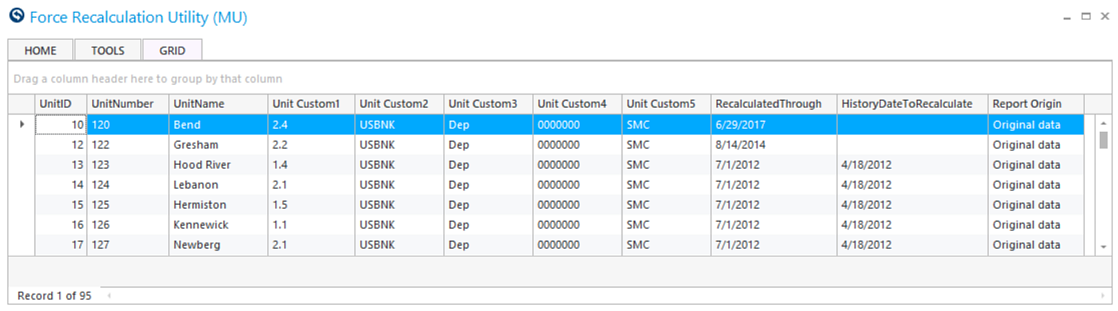
The report will list the Units recalculated along with details of the date range.
-
RecalculatedThrough: The first date within the From Date – Through Date date range where this Account/Unit combination needs to be recalculated.
 Quick Note: If the Account/Unit combination has been recalculated for the entire date range entered, the populated date will be the day after the Through Date.
-
HistoryDateToRecalculate: The first date in the Account/Unit combination history where this account has not be recalculated.
 Quick Note: If this column is blank, this Account/Unit has been recalculated for all days up to the From Date.
Recommendations
Run the report for the entire date range for which this account’s calculation should be updated to get the full picture of whether this account has been completely recalculated.